This is week 1 of the 30-day SEO transformation series. Each week focuses on a specific Oncrawl Lens and provides a practical playbook for improving your site’s search visibility.

Week 1: Build your SEO foundation with the Crawl Discovery Lens
Let’s say you manage an e-commerce site that has roughly 47,000 pages, but only 4,000 are indexed. That’s probably something you want to fix as quickly as possible. But where do you even start?
When you have invested a lot of time and energy into building a comprehensive website with quality content, it can be disconcerting to find that your rankings tell a different story.
This is common for large enterprise sites, where identifying the root cause is rarely straightforward. The truth is simple but frustrating; manual checks rarely reveal the underlying structural issues that matter most. Without better visibility into your site’s crawl health, you’re optimizing in the dark.
What’s really at stake
These types of issues aren’t merely technical nuisances, they directly impact your bottom line including:
- Unexplained traffic loss: Impressions and clicks declining for months, but your analytics can’t pinpoint the cause.
- Wasted optimization efforts: Hours spent improving content on pages that search engines can’t even reach.
- Growing technical debt: Small issues compound over time, preventing new content from performing.
- Diminished competitive advantage: While you’re diagnosing problems manually, competitors with better infrastructure are capturing your market share.
Based on the different trends that we’ve observed, enterprise sites lose an average of 30-35% of their potential crawl budget to easily fixable issues. The visibility gap between your total content and what’s actually discoverable in search represents millions in lost revenue opportunity.
The challenge
Let’s ground this in a realistic scenario we can follow throughout the guide.
The multi-brand e-commerce platform
Returning to our initial example, imagine you’re managing SEO for a multi-brand e-commerce site that has the following characteristics:
- Total URLs: 47,000
- Product pages: 28,000
- Category pages: 850
- Blog and content pages: 3,200
- Current organic traffic: 185,000 visits per month
- The problem: Impressions have declined 15% over the past three months, but you don’t know why.
You know something is wrong structurally, but with nearly 50,000 URLs to analyze, manual investigation would be too tedious and time consuming. The best way to tackle the problem is with a systematic approach that surfaces the critical issues quickly.
The solution
With the Crawl Discovery Lens, you can eliminate the guesswork in diagnosing your site’s health problems. This specific lens provides executive-friendly reports that map your entire SEO funnel.
It will save you hours of time that you may have spent on correlating crawl logs, server data, and analytics. Think of it as your site’s health dashboard; it automatically identifies crawlability, indexability, and optimization. You can then prioritize your actions based on severity and business impact.
What makes the Crawl Discovery Lens different is that it’s designed for clarity. It presents a visual SEO funnel that anyone can immediately understand.
Why this matters now
AI-powered search and query fan-out are an integral part of the search experience, so your site’s structural health is very important.
If search engines can’t efficiently crawl your site, they can’t evaluate your topical depth or determine whether your content is relevant enough to cite.
Week 1 is about building the foundation. You can’t optimize content (week 2) or monitor performance (week 3) if your technical infrastructure is broken.
Fix the foundation first. Everything else follows.
The goal by Friday
Week one of the playbook will walk you through a 5-day action plan for using the Crawl Discovery Lens.
By the end of the week, you will have a prioritized action plan that identifies your site’s top 3-5 structural issues, complete with clear owners and implementation timelines.
The 5-day playbook
Let’s examine how to use the Crawl Discovery Lens to diagnose your site’s structural health in one, focused week.
Days 1-2: Setup & discovery
Step 1: Set up your crawl
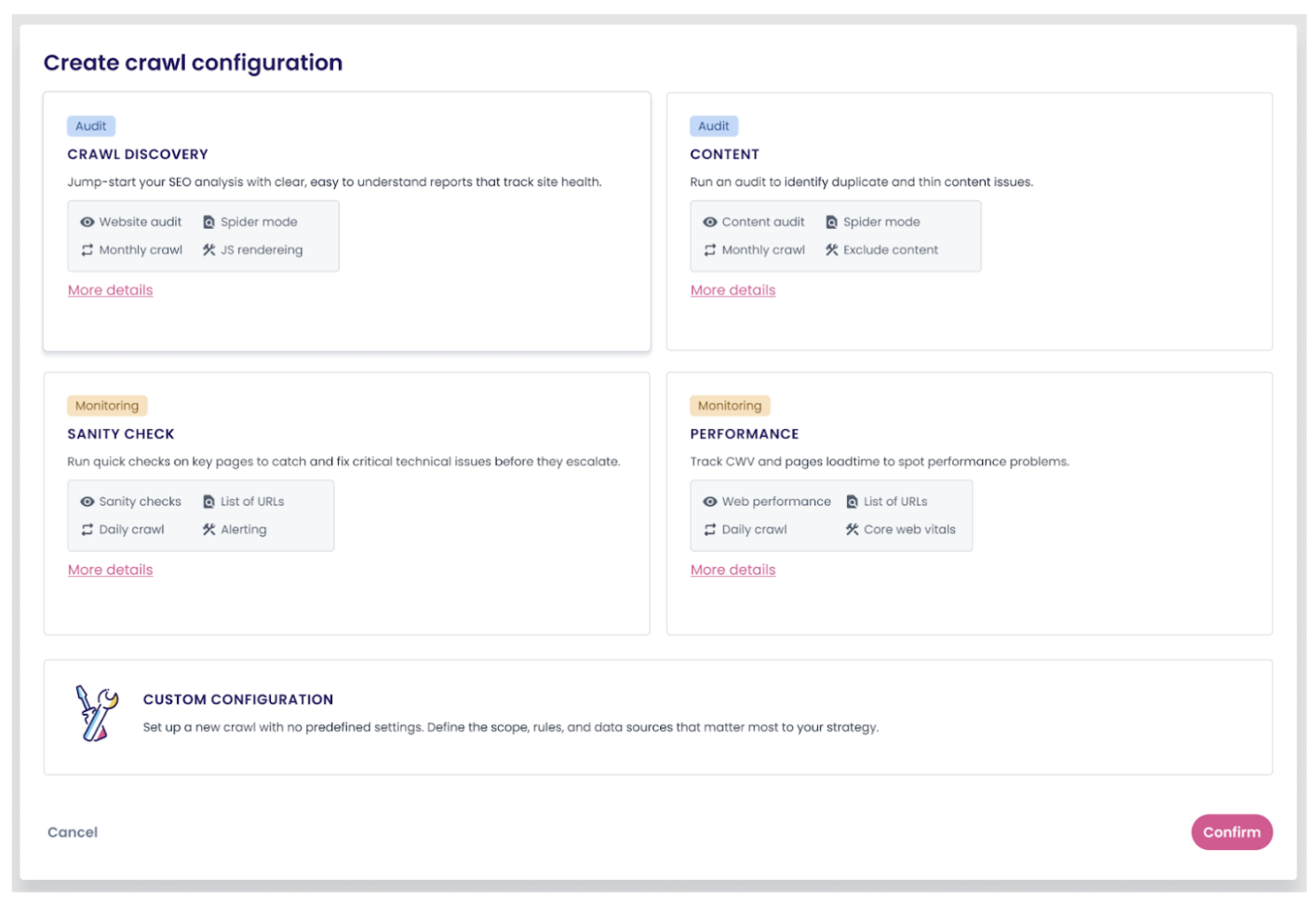
When you open a project in Oncrawl, you’ll see entry points for each available lens. From here you can pick the Crawl Discovery Lens. The pre-configured crawl setup is optimized specifically for structural diagnosis, saving you from having to manually configure your settings.
Step 2: Add scraping rules (optional)
Data scraping allows you to extract and analyze specific elements from your page source code during the crawl. You can subsequently create custom fields for advanced segmentation.
This could be particularly useful for an e-commerce site if you want to segment based on pricing, review counts, product availability, promotion tags, stock levels, or brand identifiers.
Custom fields give you the flexibility to segment and filter more strategically. For example, you can identify which out-of-stock products have indexability issues, or which high-priced items are suffering from crawlability problems. This level of granularity helps you prioritize fixes based on actual business impact.
Step 3: Connect your data sources
While optional, connecting external data sources increases the value of your crawl analysis:
- Google Search Console allows you to see which uncrawlable pages are somehow getting impressions.
- Google Analytics can help you understand which technical issues are affecting your highest-traffic pages.
You can uncover interesting insights when you overlay crawl data with GSC and ultimately unearth some quick wins.
Now, wait for your crawl to complete. Depending on your website’s size, crawl speed, the number of URLs analyzed, and any connected data sources, on average the process can take anywhere from 2 to 8 hours. It runs automatically in the background.
Days 3-4: Analysis
Step 4: Review your SEO Funnel
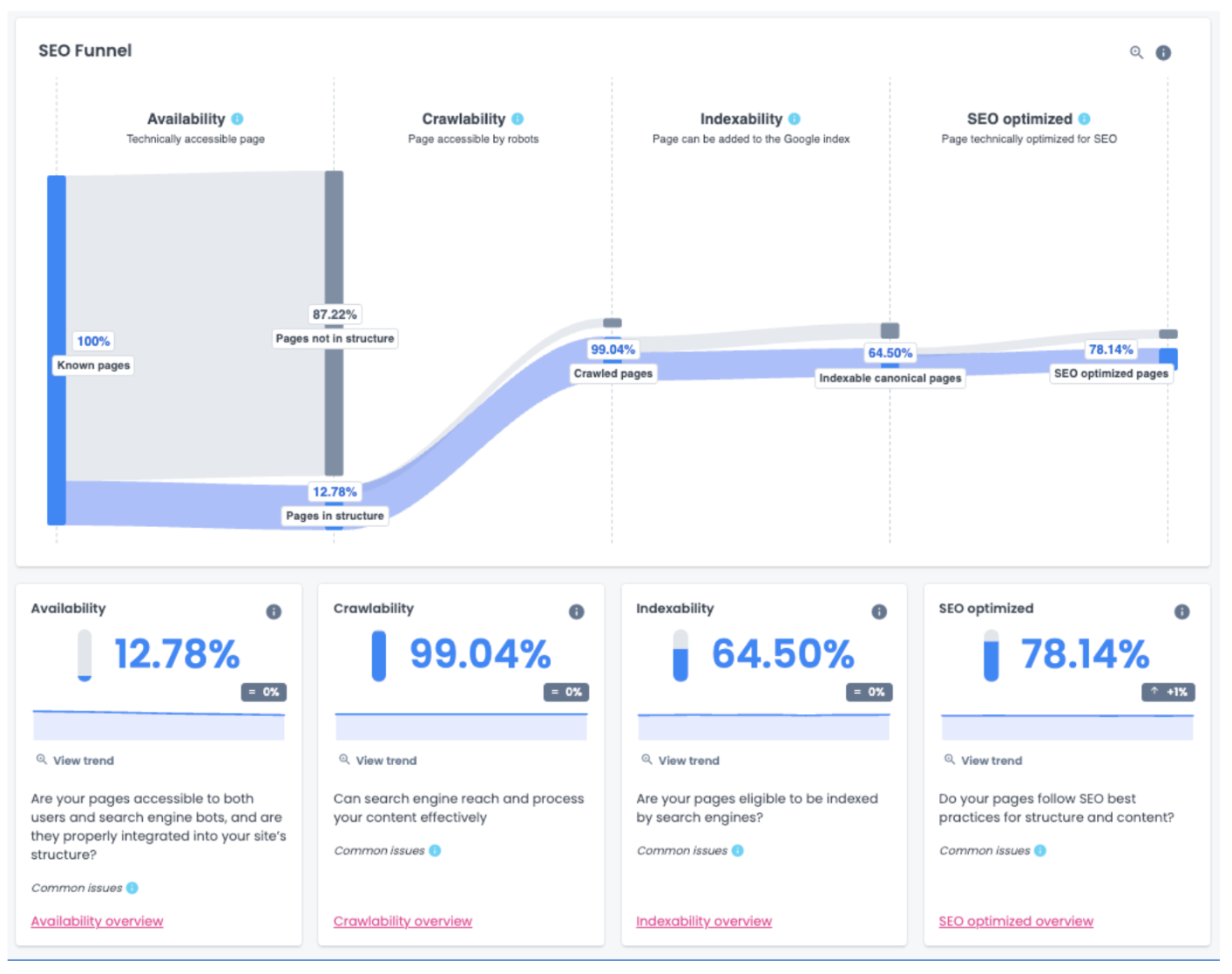
Once your crawl is complete, you can access your SEO funnel which visualizes your site’s health across four critical dimensions:
1. Availability: What percentage of your URLs are in your site structure? How many orphan pages exist outside your site? This reveals the content both bots and users can access.
2. Crawlability: Are search engine bots encountering pages with only nofollow links, pages that time out or robots.txt blocks? These issues prevent proper site exploration.
3. Indexability: Which pages have noindex tags, canonical issues, or other signals telling search engines not to include them in their indexes? Sometimes these are intentional, but often they’re accidents.
4. SEO optimization: Which pages utilize SEO best practices? Do your pages have a title? Is the page more than 150 words? Do they have canonical tags? Do any pages have duplicate content?
Step 5: Identify your top 3 issues
Use your dashboard to identify patterns across your segments. Look for issues that:
- Affect large numbers of pages
- Impact your highest-value page types
- Have clear business consequences
- Can be fixed with reasonable effort
Document each issue with the affected page count and impact level.
Example from our e-commerce scenario:
| Issue | Affected Pages | Impact Level |
|---|---|---|
| Pages not in structure (orphan pages with zero internal links) | ≈ 40,00 | Critical – Zero discoverability |
| Low indexability | ≈ 2,100 | High – No index or canonical issues |
| Available pages only partially optimized | ≈ 470 | Medium – Unoptimized indexed pages could include key product or category pages |
In this scenario, over 40,000 pages aren’t even part of the site structure. This represents content that exists but has no internal links pointing to it, making it essentially invisible to both users and search engines.
Only about 60% of crawled pages make it into Google’s index. This gap suggests that search engines see the pages but choose not to include many of them in the search results. This limits organic visibility dramatically as search engines are discarding a significant amount of potential content that could drive impressions or clicks.
Although a lot of the indexed pages are optimized, the remaining 10% of indexed pages that aren’t could include key product or category pages. For an e-commerce site, missing structured data, poor title tags, or under-optimized product descriptions can significantly reduce CTR and revenue potential.
Day 5: Action planning
Step 6: Prioritize based on impact
Not all issues are created equal. Use a simple prioritization framework:
- P0 (Critical): Issues affecting high-value pages with severe impact on visibility or revenue.
- P1 (High): Significant issues affecting many pages or important segments.
- P2 (Medium): Issues with moderate impact or affecting lower-priority pages.
Consider both business impact and implementation effort. Sometimes a P1 issue that’s quick to fix should jump ahead of a P0 that requires months of development work.
Assign clear owners for each issue. Technical problems require developer time, content issues need your SEO or content team, and some issues require cross-functional coordination.
Step 7: Create your implementation roadmap
Map each issue to a realistic implementation timeline. Be honest about your team’s capacity and technical constraints.
Sample action plan from our scenario:
| Priority | Issue | Action | Owner | Timeline |
|---|---|---|---|---|
| P0 | Pages not in structure |
| Technical SEO Lead & Dev team | Week 2 |
| P1 | Low indexability |
| Technical SEO Lead | Weeks 2-3 |
| P2 | Available pages only partially optimized |
| SEO & Content Teams | Ongoing |
Prepare an executive summary with your key findings. This should be one page maximum, highlighting:
- The top 3 issues discovered
- Business impact of each issue (traffic loss, indexation problems, etc.)
- Proposed fixes and owners
- Expected timeline for implementation
- Baseline metrics you’ll track to measure improvement
Document your baseline metrics carefully. You’ll need these to prove ROI as you implement fixes over the coming weeks.
What success looks like
By the end of week 1, you should have four concrete deliverables:
✔️ Complete structural audit with baseline metrics documented
✔️ Top 3-5 issues identified with affected page counts
✔️ Prioritized action plan with clear owners assigned to each issue
✔️ Executive-ready summary for stakeholder communication
These aren’t theoretical exercises. You should now have a roadmap for the next 30 days of optimization work.
Pro tips
Tip 1: Segmentation established in week 1 will support your analysis across all four weeks
Once your first crawl is completed, you can set up segmentation based on your site’s structure. This segmentation will be used throughout the 30-day transformation, so invest time in getting it right.
The most effective approaches:
- By template type: Products, categories, blog posts, landing pages
- By product category: Electronics, apparel, home goods, etc.
- By business priority: High-value pages, seasonal content, new inventory
For our e-commerce scenario, you would most likely segment by template (products, categories, blog) and by top product categories.
Why this matters: With the right segmentation, you can immediately see which page types are causing problems.
Without it, you’re looking at site-wide averages that hide the real story.
You might see that 20% of your pages have redirect issues, but segmentation reveals that 60% of your product pages have this problem while your blog is fine. That specificity changes how you prioritize and resource your fixes.
Tip 2: Connect GSC
Integrating GSC with your crawl data can help you discover actionable insights. It is an integration that often reveals your biggest opportunities.
You might find product pages getting 10,000 impressions per month but suffering from redirect chains that prevent them from ranking well. Fix the technical issue and that existing search demand can convert into actual traffic.
Tip 3: Focus on revenue pages first
Prioritize issues affecting high-value pages: products, categories, key landing pages. Let business impact, not page count, guide decisions.
Common mistakes to avoid
As you work through week 1, watch out for these common pitfalls:
Trying to fix everything simultaneously
You’ll overwhelm your development team and struggle to measure what actually worked. Focus on your top 3-5 issues.
Skipping stakeholder communication
Technical SEO requires buy-in from developers, product managers, and executives. Share your findings early and often.
Closing thoughts
Structural health is the foundation of everything else in SEO. You can’t optimize content that search engines can’t find and you can’t improve performance on pages that aren’t being crawled.
Week 1 is about establishing that foundation so the optimization work in weeks 2-4 can actually deliver results.
Want to follow along with the complete playbook? Download this guide as PDF for easy reference.
Up next: Content optimization
In week 2 of our 30 day transformation playbook, we’ll shift from structural health to content quality. You’ll learn how to use the Content Lens to:
- Identify thin content
- Eliminate content cannibalization
- Uncover opportunities to improve your content’s performance
The structural work you’re doing this week makes everything in week 2 possible.