
This is week 3 of the 30-day SEO transformation series. Each week focuses on a specific Oncrawl Lens and provides a practical playbook for improving your site’s search visibility.

Week 3: Protect your progress with the Sanity Check Lens
You’ve reached the halfway point of the 30-day transformation. In week 1, we worked on fixing critical structural issues that were blocking pages from being discovered and indexed. In week 2, we began optimizing content quality to ensure those pages were worth ranking.
You’ve made significant progress, but SEO gains are fragile. A single misconfigured redirect or an accidental noindex tag can undo weeks of optimization work overnight. This week focuses on proactive monitoring to prevent regressions before they impact traffic.
What’s really at stake
The work you’ve done in weeks 1 and 2 has real business value, but if you aren’t continuously monitoring your site, you’re vulnerable to:
- Silent regressions: A deployment or CMS update can undo weeks of optimization work before anyone notices.
- Cascading technical issues: A small change in one area can ripple across your entire site structure.
- Delayed detection: Without active monitoring, problems that would take minutes to fix on day one can cost you weeks of lost traffic by the time they surface in your analytics.
Considering that we operate in an industry where algorithm updates can throw you for a loop or where AI-powered search visibility depends on consistent technical health and content quality, you can’t afford to fly blind.
The challenge
Let’s return to our multi-brand e-commerce platform scenario. (47,000 URLs, 185,000 monthly visits).
Where we left off after week 2:
Your site has come a long way: you’ve reintegrated your high-priority orphan pages, started fixing indexability issues, and are well on your way to improving content quality scores. Initial results show a 12% increase in indexed pages and early signs of improved rankings.
This week’s challenge:
Now that you’ve started making improvements and seeing positive results, you want to make sure you keep seeing progress. To do so, you need to identify:
- How to monitor your URLs without drowning in data
- Which pages deserve priority monitoring
- What changes could undo your recent gains
- How to catch issues before they impact revenue
Much like with your content, manual spot checks aren’t sustainable at scale. You need a structured process to help you focus on your key pages.
The solution
The Sanity Check Lens transforms monitoring from a reactive chore to a proactive strategy. Traditional monitoring tends to treat all pages equally. The Sanity Check Lens, however, lets you define your business-critical pages and run quick checks to catch and fix technical issues before they escalate.
Why this matters now
Trying to stay on top of search is like tracking a moving target. For example, development teams can push new code without warning or content management systems roll out new updates often, causing your site structure to shift in ways that impact crawlability and visibility.
If you aren’t regularly monitoring your site, you’ll inevitably be playing catch-up. By the time you notice a traffic drop, the damage is already done. The Sanity Check Lens helps you shift from damage control to damage prevention.
The goal by Friday
By the end of week 3, you’ll have established a monitoring framework that preserves your SEO improvements. You’ll know exactly which pages to watch, what signals to track, and how to respond when issues arise.
The 5-day playbook
Let’s secure your SEO gains with the Sanity Check Lens.
Day 1: Identify and prioritize which pages to monitor
Step 1: Define which pages or types of pages you should be monitoring
All of your pages don’t deserve equal attention when it comes to monitoring. Start by establishing clear criteria for what makes a page important to your business.
You may want to focus on revenue drivers, your top organic landing pages, pages that rank for your brand terms, and strategic assets like new product launches or seasonal campaigns.
For our e-commerce scenario, these pages could be:
- Top 100 revenue-generating product pages
- All category pages (850 pages)
- Homepage and main brand pages
- Top 20 blog posts by traffic
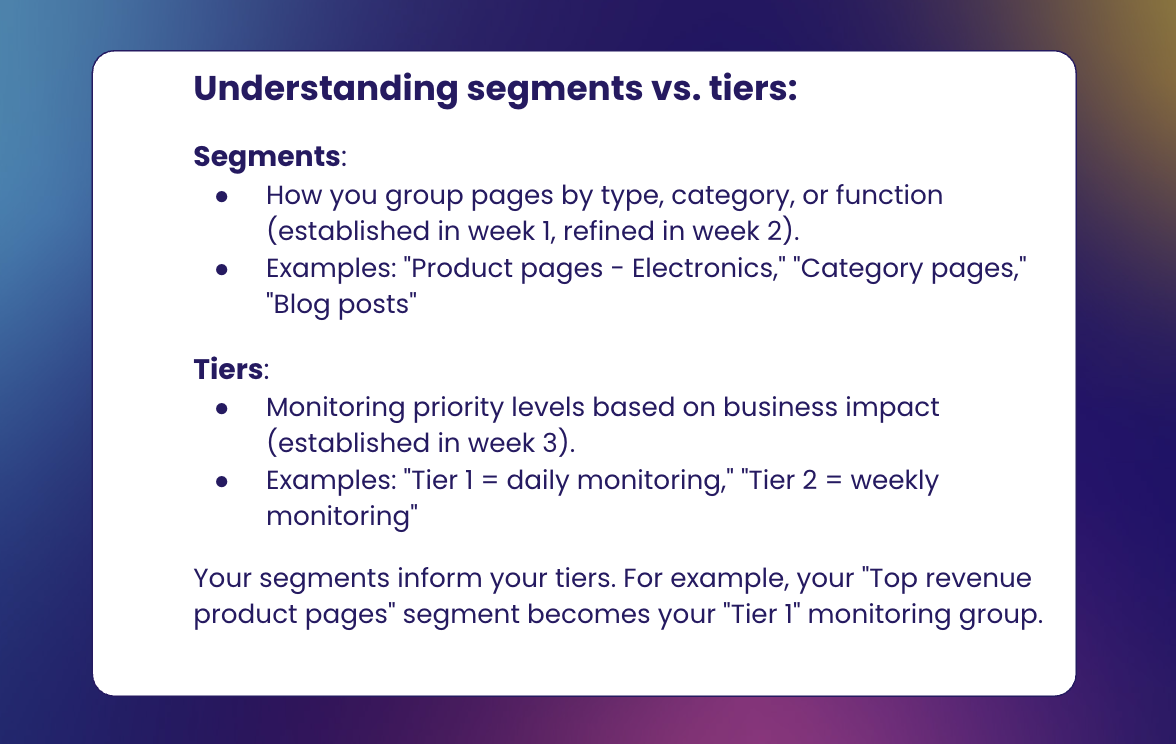
Since you’ve already established segmentation in weeks 1 and 2, you can now leverage those segments to create a tiered monitoring system based on business impact:
- Tier 1 (Daily monitoring): Top 100 revenue pages
- Tier 2 (Weekly monitoring): Category pages and key landing pages
- Tier 3 (Monthly monitoring): Supporting content and blog posts
This tiered approach focuses your resources where they matter most while still helping you maintain visibility across your site.
Step 2: Determine which parameters you want to monitor
The Sanity Check Lens monitors multiple signals that may indicate potential issues. Determine which ones make the most sense for your site.
For our e-commerce site example, we will focus on:
Availability monitoring:
- Are there any pages in the structure without internal links?
- Are there any pages with only one internal link?
Indexability monitoring:
- Are there any pages with thin content?
- Are pages responding with the correct status code?
SEO optimization monitoring:
- Are any indexable pages missing meta descriptions?
- Are any pages missing an H1 tag?
Day 2: Update baselines and establish alert thresholds
Step 3: Update baseline metrics
Before you can detect problems, you need to know what “normal” looks like. Therefore, document current metrics for your important pages.
Note: These baseline metrics reflect your site’s current state after implementing week 1 and week 2 improvements. They serve as your new reference point for detecting anomalies going forward. Use them to identify deviations that may signal regressions or emerging issues.
| Page segment | Pages with only 1 link | Thin content | Slow loading | Missing meta description | Missing H1 |
|---|---|---|---|---|---|
| Top 100 Products | 32 | 17 | 5 | 12 | 0 |
| Category Pages | 7 | 11 | 2 | 45 | 8 |
| Brand Pages | 1 | 9 | 1 | 3 | 2 |
Step 4: Set up alert thresholds
Define when changes warrant immediate attention and which changes can wait. Be sure to consider both individual page issues and pattern-based alerts.
Note: The alert can only be created after the first crawl is available for this specific lens.
P0(immediate action required):
- Any of the Tier 1 pages losing all internal links
- More than 10% of Tier 1 pages loading slowly
P1 (investigate within 24 hours):
- Multiple Tier 1 pages show thin content warnings
- Page load time increases across a segment
- Internal links to important pages decrease by 20%
P2 (investigate within 48-72 hours):
- 5+ Tier 1 pages missing H1 tags
- New pages appearing with missing meta descriptions
P0 alerts should be considered as such if they can have an impact on your revenue.
P1 alerts address quality issues on top pages or patterns affecting multiple pages. They may not require immediate action, but they could indicate developing problems that will worsen if ignored.
P2 alerts focus on optimization issues that should be fixed but won’t immediately impact performance.
Note: These timeframes refer to how quickly you should respond to monitoring alerts, not implementation timelines. For complex fixes, you’ll still follow the prioritization framework from weeks 1 and 2.
Days 3-4: Implementation and testing
Step 5: Run your first Sanity Check crawl
Unlike the comprehensive crawls from weeks 1 and 2, Sanity Check crawls can be more focused and frequent.
Configure your crawl to focus on your target pages, run at appropriate intervals with daily checks for Tier 1 and weekly for Tier 2, and capture the specific parameters you’re monitoring.
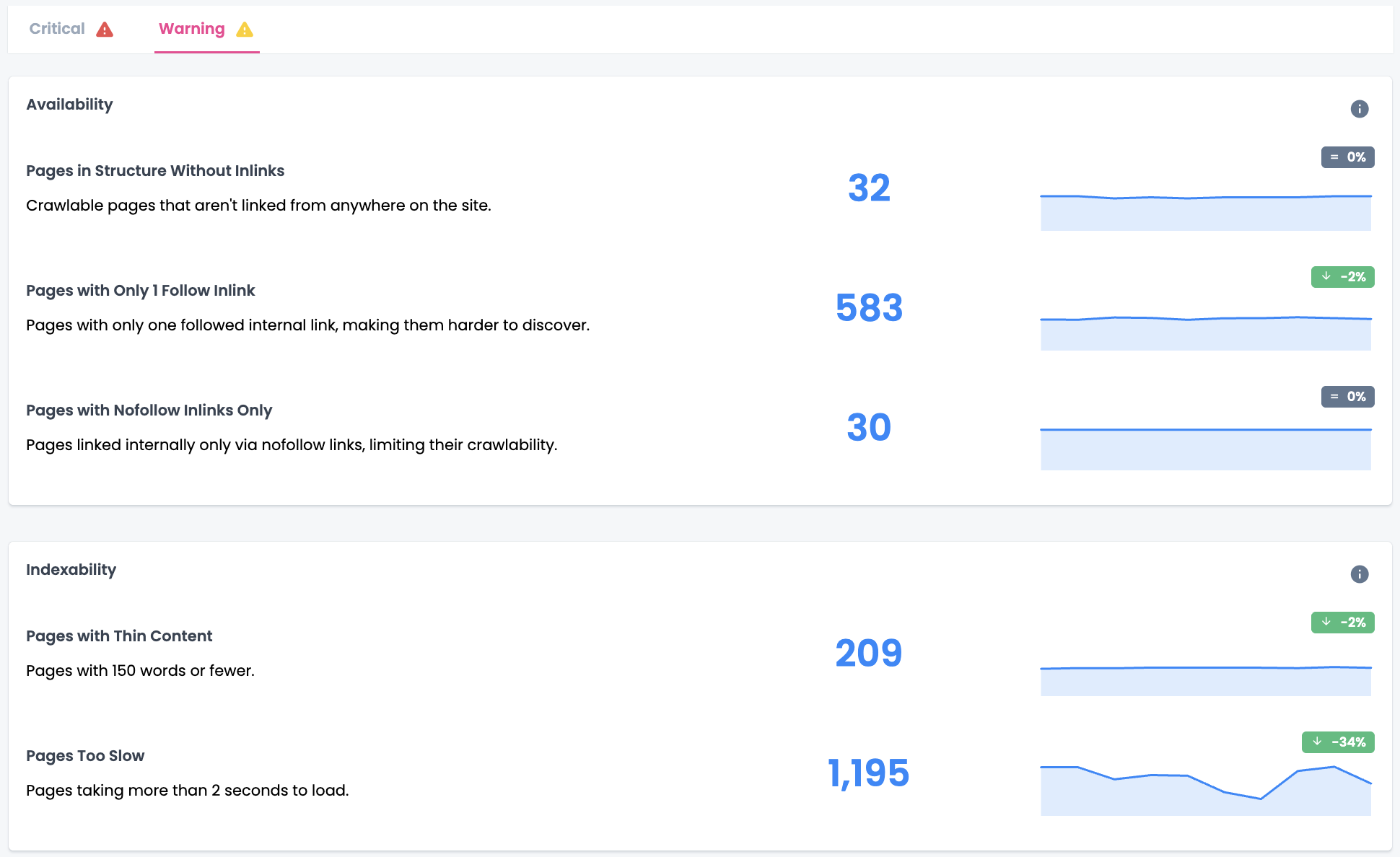
Once you’ve run your crawl, you can analyze the results. To simplify analysis, your dashboards are organized to align with each stage of the SEO funnel: availability, crawlability, indexability, and SEO optimization.
Step 6: Validate your monitoring system
Test your alerts by intentionally creating minor issues on test pages. For example, you could:
- Remove internal links from a test page to trigger a warning
- Add heavy images to slow down page loading time
- Remove meta descriptions and H1 tags from test pages
Confirm that your monitoring catches these issues and alerts you appropriately. If you’re getting too many false positives, adjust your thresholds upward. If you’re missing real problems, tighten them.
The goal is to find the sweet spot where you catch real issues without drowning in noise. This is an optional step, but could be very useful when getting started.
Note: Perform these tests on staging environments whenever possible.
Day 5: Create your operational framework
Step 7: Create your response playbook
For each type of alert, document the response process. For our e-commerce site, it would include the following elements.
A page with zero internal links
- Verify if this was an intentional removal or site restructuring, then check if the page should remain live.
- Identify appropriate pages from which to link.
- Implement internal links from related content.
- Monitor in the next crawl to confirm the page is reintegrated.
Thin content warnings
- Review if the page serves a legitimate purpose despite minimal content.
- Determine if it should be expanded, consolidated with another page, or removed.
- Implement content improvements or consolidation as needed.
- Track content score improvements.
Multiple pages show missing meta descriptions or H1 tags – this often indicates a template issue rather than isolated problems.
- Check recent CMS or template updates.
- Verify with the development team if changes were intentional.
- Create or restore the missing elements, prioritizing high-traffic pages first.
- Ensure templates are properly configured to prevent recurrence.
Step 8: Set up your monitoring dashboard
Create a simple dashboard that shows:
- Current status of all Tier 1 pages
- Week-over-week changes in key metrics
- Active alerts and their resolution status
- Trends that might indicate emerging issues
Your dashboard will become your mission control for SEO health, providing at-a-glance visibility into your site’s status.
Step 9: Establish your monitoring routine
Define clear responsibilities and schedules. You will begin to implement these routines starting in week 4.
Daily monitoring routine:
| Check Type | Owner | Action Timeline |
|---|---|---|
| Pages with 0 internal links (Tier 1) | SEO Lead | Immediate |
| Page speed issues (Tier 1) | Technical SEO | Within 24 hours |
Weekly monitoring routine:
| Check Type | Owner | Action Timeline |
|---|---|---|
| Thin content alerts (Tier 1) | Content Team | Within 24 hours |
| Internal link health trends | SEO Lead | Within 24 hours |
| Page speed trends across segments | Technical SEO | Within 24 hours |
| Missing H1 tags (Tier 1) | SEO Team | Within 48-72 hours |
| Missing meta descriptions audit | SEO Team | Within 48-72 hours |
| Comprehensive trend analysis | SEO Manager | Friday review |
Monthly monitoring routine:
| Check Type | Owner | Action Timeline |
|---|---|---|
| Full sanity check | Technical SEO | First Monday |
Your routine should balance urgency with sustainability.
What success looks like
By the end of week 3, you should have:
✔️ Identified and prioritized your important pages for monitoring
✔️ Updated baseline metrics for what normal performance looks like
✔️ Configured alerts for priority issues
✔️ Created a response playbook for common problems
✔️ Implemented a sustainable monitoring routine
Pro tips
Tip 1: Use comparative crawls strategically
The Sanity Check Lens becomes even more powerful when you compare crawls over time. Set up weekly comparative reports that highlight the key metrics you want to track so you can spot trends before they become problems.
Tip 2: Integrate with your development workflow
Share your monitoring insights with your development team. When they understand which pages are business-essential and what changes could impact SEO, they’re more likely to flag risky updates before deployment. Consider adding SEO checks to your staging environment testing.
Tip 3: Focus monitoring on high-value pages
It’s tempting to want to monitor every page, but this creates noise that obscures real issues. It’s better to catch 100% of issues on essential pages than 10% across your entire site.
Common mistakes to avoid
Alert fatigue
Setting thresholds too low creates constant alerts that your team will start ignoring. Start with conservative thresholds and tighten them as you understand your site’s normal fluctuations.
Fixing without investigating
When an alert fires, resist the urge to immediately fix it. First, understand why it happened. A sudden noindex tag might be intentional, or it might indicate a larger systemic issue.
Ignoring patterns
Individual alerts matter, but patterns matter more. Three separate pages showing increased load times might seem minor, but together they could indicate a server issue affecting your entire site.
Closing thoughts
The Sanity Check Lens gives you the confidence that comes from knowing your critical pages are under constant supervision.
Your SEO improvements from the previous weeks are only valuable if they last. What you set up this week ensures they do.
Download the complete week 3 playbook for easy reference, and get ready for the final week of your transformation.
Up next: Track speed and user experience
With your monitoring system in place, you’re ready for the final week of the 30-day transformation. Week 4 focuses on performance optimization using the Performance Lens.
This week’s monitoring framework will help you going forward as you track the impact of your performance improvements in real time.