This is week 2 of the 30-day SEO transformation series. Each week focuses on a specific Oncrawl Lens and provides a practical playbook for improving your site’s search visibility.

Week 2: Optimize what matters with the Content Lens
You’ve completed week 1 and started to fix your structural issues. Your pages are now crawlable and can be indexed, but are they worth ranking?
Just because Google can find your pages doesn’t mean it will rank them.
Week 2 shifts focus from technical infrastructure to content quality, an area with which many sites struggle. With thousands of pages, identifying which content is underperforming and why can be tedious and virtually impossible to do manually.
For our multi-brand e-commerce platform scenario (47,000 URLs, 185K monthly visits), week 1 revealed which pages weren’t technically accessible. In week 2, we will answer the question: is the content on those pages good enough to rank?
What’s really at stake
Content quality directly impacts your organic visibility in a number of ways.
- Wasted crawl budget on low-quality pages: Search and AI engines could be spending time on pages that will never rank.
- Diluted topical authority: Thin or duplicate content weakens the expertise part of your E-E-A-T signals.
- Missed ranking opportunities: Pages with fixable content issues could be sitting on page 2 or 3 of the SERPs.
Google uses your full range of content to evaluate topical depth and authority. Ensuring content meets quality standards is non-negotiable.
Even if your site’s technical SEO is flawless, it won’t appear in AI Overviews or expanded results if it has thin, poorly optimized content.
The challenge
Where we left off after week 1:
Your multi-brand e-commerce platform has established an action plan to resolve the major structural issues. You are well on your way to reintegrating the high-value orphan pages and canonical tags are properly implemented.
The new challenge:
Now that the key pages are technically accessible, you’re discovering quality issues:
- Product pages with minimal descriptions
- Inconsistent title tag formats across categories
- Missing or poorly optimized meta descriptions
- Grammar and spelling errors signaling low authority
A manual audit at this scale isn’t realistic. You need a better way to identify which content needs improvement and how to prioritize fixes.
The solution
An audit is only as valuable as its ability to help you make improvements. The Content Lens was designed to diagnose content quality at scale, using AI-driven insights to turn your analysis into action.
The Content Lens is built on a dual-layered evaluation system. It encompasses a global performance score paired with detailed insights across five foundational pillars of content quality:
- Grammar and spelling
- Title structure
- Keyword optimization
- Meta tag optimization
- Relevance and user experience
When you conduct an audit, each page receives a Global Score (0 to 10), serving as an immediate benchmark of overall content health. Additionally, each score comes with:
- A detailed explanation of how the score was determined.
- A targeted, page-level recommendation tailored to the specific issue.
It highlights underperforming pages, explains why they fall short, and suggests clear fixes.
Why this matters now
The web is saturated with content. Getting yours discovered depends on how clearly it demonstrates expertise and value while responding to user intent.
Search engines and users are looking for those pages that are high-quality and that answer the questions they have yet to ask.
The Content Lens surfaces the places where your site meets (or misses) those expectations and gives you what you need to make sure your pages stand out.
The goal by Friday
By the end of the week, you should have identified your top content quality issues, zeroed in on specific improvement recommendations for priority pages, and created an optimization roadmap focused on your money pages.
The 5-day playbook
Let’s use the Content Lens to diagnose your content issues in one week.
Day 1: Setup & discovery
Step 1: Set up your crawl
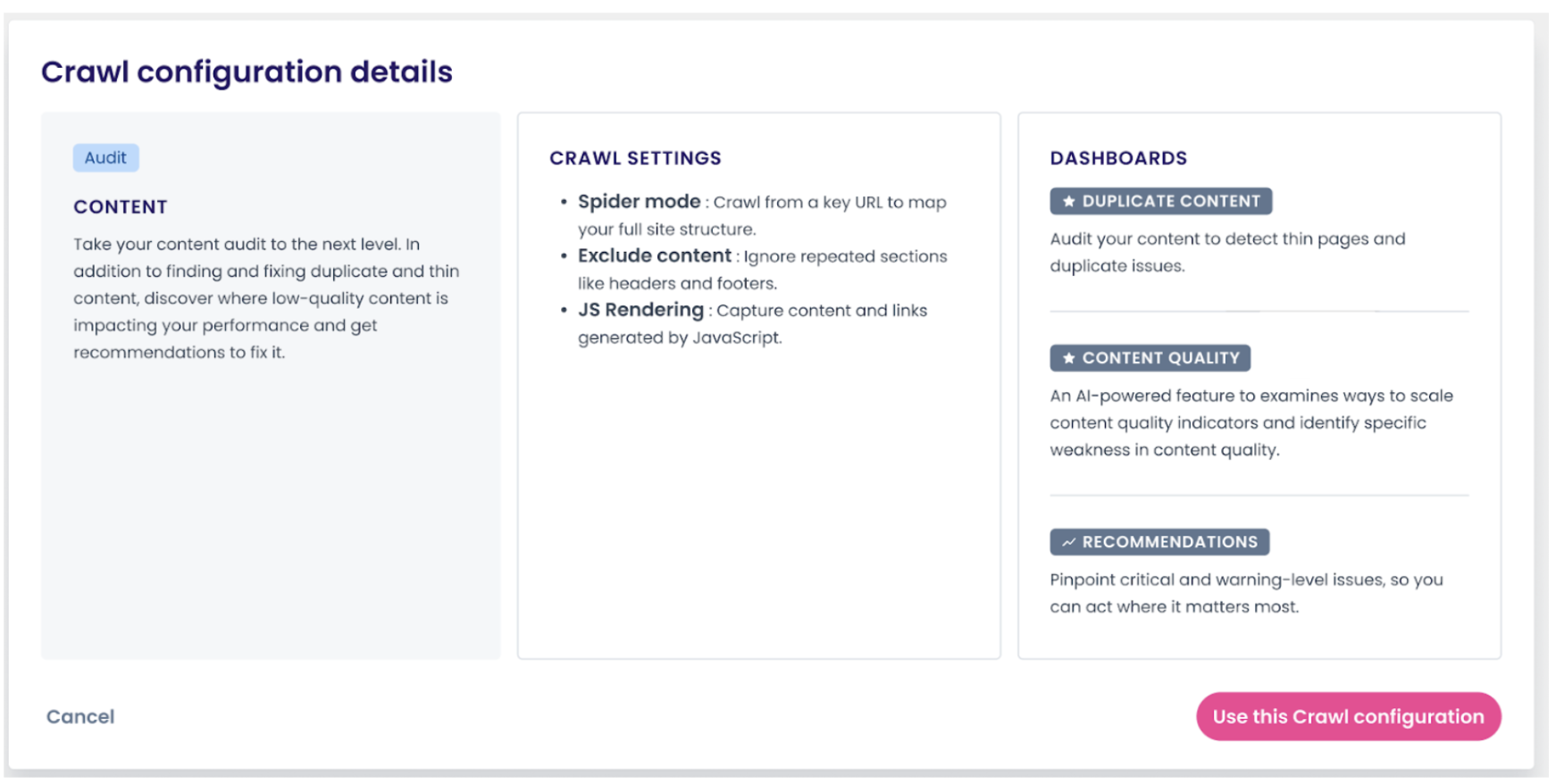
As you saw in week 1, when you create a new configuration in a project dashboard, you have the option to choose from the preset entry point of available lenses.
This time, choose the Content Lens. This crawl configuration is set up specifically to find duplicate and thin content while ignoring repeated sections and capturing JavaScript content and links.
Step 2: Review your scraping rules and data connections
If you haven’t already completed these steps in week 1, now would be a great time to do so.
Adding scraping rules lets you capture custom fields, like product availability or pricing, that enrich your analysis. With this information, you can link content quality scores to meaningful business metrics.
Integrating Google Search Console and Google Analytics helps uncover interesting patterns like which low-quality pages still earn impressions but few clicks or which content issues are holding back your best-converting pages.
Days 2-4: Analysis
Step 3: Consider redefining your segmentation with content analysis in mind
As a reminder, custom segments can be created after your first crawl. After your first Content Lens crawl is complete, refine your segments to focus specifically on content performance.
For e-commerce sites, consider basing your segmentation on:
- Template type (product pages, category pages, brand pages)
- Product category or brand
- Price tier or inventory status (using scraping rules)
For content sites, the following types of segmentation could be beneficial:
- By content type (articles, guides, landing pages)
- By topic or category
- By author or publication date
When you discover exactly which section or types of pages are impacting your content score, that level of specificity will inform your approach to optimization.
Step 4: Review your content quality dashboard
Now, you can head to your Content Lens dashboard and start looking through your key visualizations. Here, you will find insights into your:
1. Average content global score
Your site-wide benchmark (0-10 scale). This gives you an immediate sense of overall content health.
2. Average scores by pillar
The breakdown of performance across the five pillars we identified earlier.

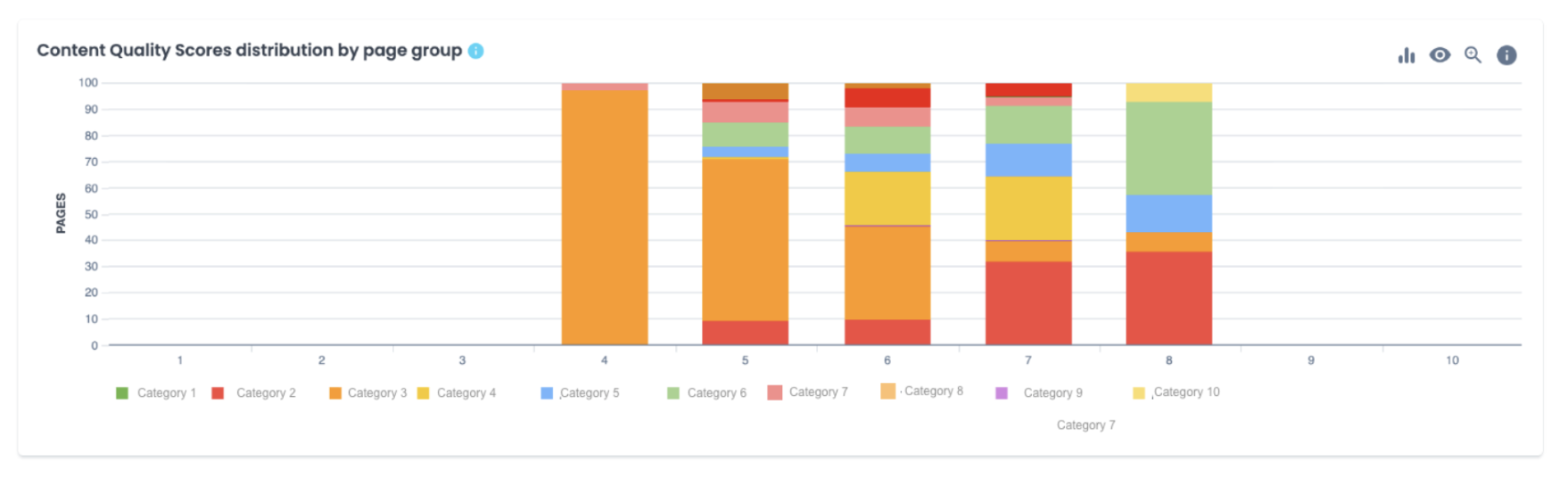
3. Content quality scores distribution by page group
Quickly visualize how different segments perform. It becomes easy to see how each segment compares and where issues concentrate.
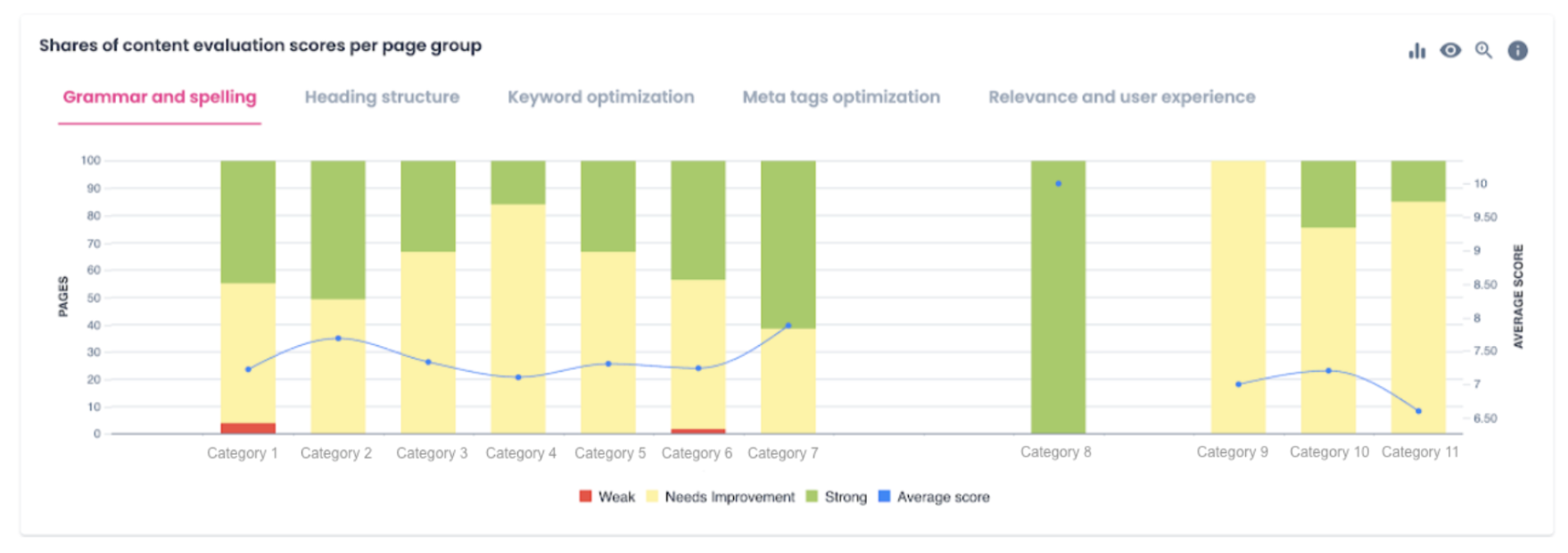
4. Shares of content evaluation scores per page group
Presents what percentage of your pages score as “strong,” “needs improvement,” or “weak” across the five pillars.
Step 5: Identify patterns across segments
Use your segmentation to spot systematic issues like templates with consistently low scores on specific pillars, pages getting traffic but scoring poorly, or high-value pages with fixable content issues.
Example from our e-commerce scenario:
| Segment | Average global score | Weakest pillar | Pages affected |
|---|---|---|---|
| Product pages – Electronics | 7.2 | Meta tag optimization | 8,400 |
| Product pages – Apparel | 4.8 | Relevance and UX | 12,000 |
| Category pages | 6.5 | Keyword optimization | 850 |
| Brand pages | 5.9 | Title structure | 380 |
In this scenario, the apparel product pages have a thin content problem that’s critical: it’s affecting 12,000 pages. A likely explanation is that this segment has minimal product descriptions which don’t provide much value.
From there, you can drill down into individual pages to understand why they’re scoring poorly. For each page, the Content Lens also provides a global score plus an individual score for the five pillars.
Day 5: Action planning
Step 6: Prioritize based on impact
Continue using the prioritization framework introduced in week 1:
- P0 (Critical): High-value pages (by revenue or conversion) with severe content issues.
- P1 (High): Large numbers of pages with fixable issues affecting important segments.
- P2 (Medium): Lower-priority pages or issues requiring more complex solutions.
Step 7: Create your content optimization roadmap
When creating your roadmap, remember to keep in mind which projects are running concurrently and what a realistic timeline would look like.
You also want to consider business value, the scale of impact your changes will make and the level of difficulty required to implement the fixes.
Sample action plan from our scenario:
| Priority | Issue | Action | Owner | Timeline |
|---|---|---|---|---|
| P0 | 12K apparel products with thin content |
| Content team + Product managers | Weeks 3-4 |
| P1 | 8.4K electronics pages missing meta descriptions |
| SEO + Content teams | Week 3 |
| P1 | 850 category pages with keyword gaps |
| SEO team | Week 4 |
| P2 | 380 brand pages with poor title structure |
| SEO team | Ongoing |
If you remember from last week’s Crawl Discovery timeline, week 2 is where we fix P0 issues from week 1. Week 2 now also includes content audit and planning.
Week 3 will add monitoring while content P0s begin implementation.
Week 4 is dedicated to continuing content work as well as keyword optimization and performance analysis.
Any ongoing tasks are lower priority items that will extend beyond the 30 days.
Step 8: Prepare an executive summary
Prepare your one-page executive summary that highlights the key findings from your audit.
Focus on the top three content quality issues, explain the business impact behind your findings and outline the fixes and expected outcomes.
Close with a clear timeline and don’t forget to track your baseline metrics to help monitor progress as you go.
What success looks like
By the end of week 2, you should have five concrete deliverables:
✔️ Complete content quality audit with scores across five pillars
✔️ List of systematic content issues by template or segment
✔️ Page-level diagnostics for priority pages
✔️ Prioritized optimization roadmap
✔️ Executive-ready summary
Pro tips
Tip 1: Use the recommended improvement actions chart strategically
This view aggregates content issues across your site and ranks them by frequency and impact. Start with the recommendations to help you prioritize.
Tip 2: Correlate content scores with performance data
Pages with decent traffic but low content scores are your quick wins. They’re already getting impressions, so improving content quality can often lead to immediate ranking and conversion improvements. Filter for pages with high impressions but low scores in GSC.
Tip 3: Focus on fixing templates when possible
When the aggregated recommendations chart shows thousands of pages with similar issues, like meta descriptions or heading structures, that’s a template problem. Work with your dev team to fix the root cause rather than editing pages one-by-one. This will scale your impact exponentially.
Common mistakes to avoid
Don’t chase scores alone
The scores tell you what’s wrong. The page-level recommendations tell you how to fix it. Don’t just chase higher numbers, focus on improving the pages that matter most to your business.
Not documenting baseline metrics
Without “before” measurements, you can’t prove ROI or understand which fixes had the most impact or know if your optimizations are actually working.
Closing thoughts
Content quality is the bridge between technical SEO and business results. Week 2 is about making sure the pages that search engines and AI search can find are actually worth ranking.
Want to follow along with the complete playbook? Download this guide as PDF for easy reference.
Up next: Monitoring and protection
Week 3 looks into ongoing maintenance. We’ll walk through how to use the Sanity Check Lens to monitor your most important pages and catch visibility-threatening issues before they cost you traffic and revenue.
The optimization work you’re doing this week only matters if you can protect it. Week 3 ensures you maintain the benefits of your recent improvements.