
When a technical SEO audit involves tens of thousands of pages, the constraint is no longer the data. You already have the data: Oncrawl collects it, cross-references it, and makes it readable. The real challenge is the time it takes to turn that data into a structured, prioritized, and justifiable report.
Oncrawl’s MCP server turns the tables and helps you turn a full audit into a clean report in about twenty minutes of dialogue with an agent. By connecting your crawls to a model like Claude or GPT, you transform your datasets into something that LLMs can use right away, without needing to go through API documentation. The model queries your data, cross-references it, and responds to you naturally.
This article is the first in a two-part series and is aimed at two types of readers:
- If you’re new to Oncrawl: an agent
/auditorperforms a comprehensive technical audit of your site. This audit is based on four analyses that provide a thorough overview: a crawl discovery, a crawl-over-crawl comparing JavaScript and raw HTML, and a crawl benchmark of two or three competitors. If you use Content Lens, enable it to include a content quality assessment in the audit. - If you’re already familiar with the platform: an initial example of an advanced prompt shows you how to use the MCP as an OQL query generator that you can test and replicate in Oncrawl’s Data Explorer
The second article, which will be published shortly, will delve deeper into advanced use cases: joining page and link datasets, log alerts and crawl-over-crawl, and integration with Google Search Console’s URL Inspection API.
Note before you begin: Depending on the volume of your crawl, these analyses can consume a significant number of tokens on the LLM side. See the limitations section at the end of the article for ways to keep costs under control.
Definition
Before getting into the specifics, there’s a term that will come up throughout this article and deserves to be clearly defined.
MCP (Model Context Protocol): a protocol that allows a model like Claude or GPT to access third-party tools (Oncrawl, in our case) to perform complex tasks.
The data is structured and presented to the model in a standardized way. You connect the MCP to the LLM via OAuth or an API key, and the model handles the interpretation: it understands the documentation and knows how to use the tools made available to it.
Getting started
To follow the use cases in this article, you will need three things:
- An active Oncrawl account with at least one project configured;
- A Claude Code or Codex environment installed on your device;
- The Oncrawl MCP server connected to your LLM.
Configuring the MCP takes a few minutes: authentication via API key, registering the server in your Claude Code or Codex client, and testing the connection. The procedure is documented step-by-step in the Oncrawl MCP Server Installation Guide.
If you wish to use the content quality feature of the audit agent, also verify that Content Lens is enabled on your project. This is not a deal-breaker: without Content Lens, the agent will simply report that this aspect cannot be analyzed, as specified in its procedure.
Use case #1: Launch a technical audit with the agent /auditor
Think of the auditing agent as a senior SEO consultant tasked with auditing your website. In order for them to produce a meaningful report, they need the right context, which means having the right crawl data available beforehand.
The tool doesn’t simply list errors, it cross-references multiple scans of your site to formulate technical hypotheses and prioritized recommendations. Three analyses cover the key areas it needs to examine.
A crawl with JavaScript enabled
It reflects what Google sees after JavaScript runs, i.e., the second indexing wave. This is the most comprehensive view of your site structure: all client-side injected links, all dynamically generated pages, and all rendered content.
A crawl without JavaScript
This shows what Google sees immediately during the first indexing wave. This is also what AI bots like ChatGPT, Perplexity, or Claude see, as they do not execute JavaScript. Comparing the two crawls reveals what depends on deferred rendering: navigation links, listings, pagination, and critical content. The greater the discrepancy, the more vulnerable the site is to indexing delays and the less visible it is to AI bots.
A crawl-over-crawl between the two
A comparative analysis highlights, page by page, what appears or disappears depending on whether JavaScript is executed or not. This is what allows the agent to quantify the impact of JavaScript rendering on your internal linking structure and the discoverability of your site architecture.
The two or three competitor domains included in the crawl discovery serve another purpose: to provide the agent with a basis for structural comparison. The aim is not to compare inranks—which are not comparable across different crawls—but to assess your site based on objective metrics: average depth, orphan page rate, ratio of links in JS versus raw HTML, and link structure quality.
Start the crawls
All three analyses can be launched from the Oncrawl interface in less than ten minutes. The time it takes to run them will depend on the size of your website.
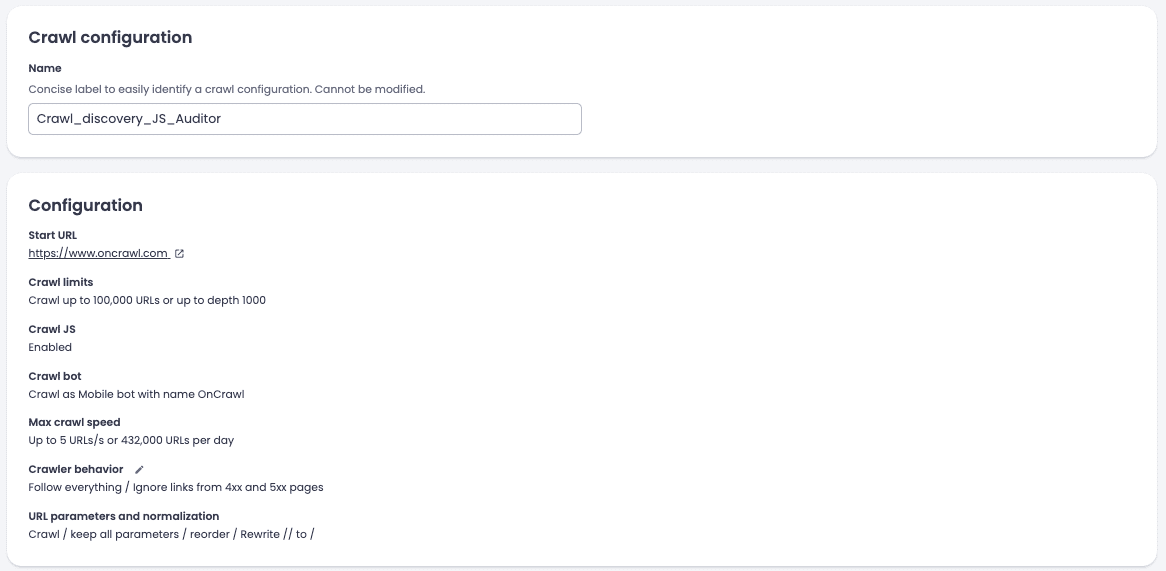
1. Crawl discovery with JS rendering and two competitor domains
This crawl provides the most comprehensive view the agent will have of your site structure.
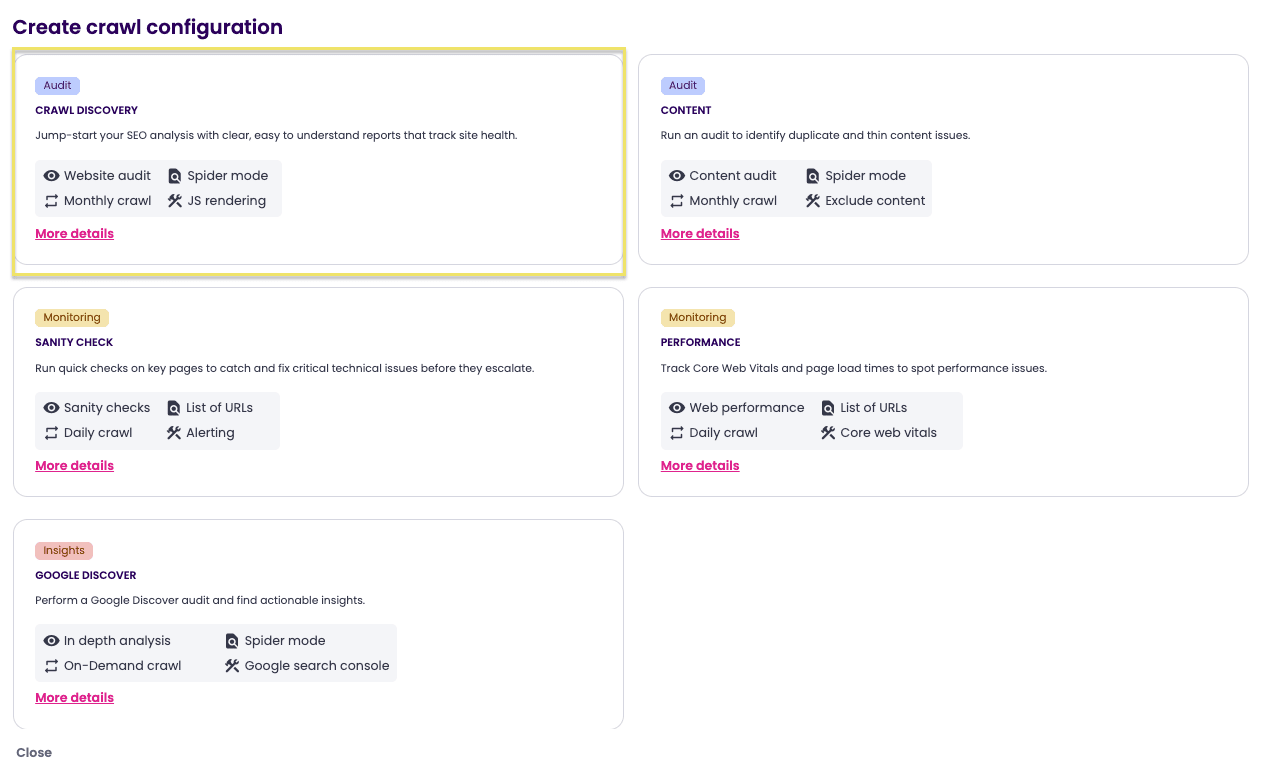
- Click create-configuration, then select Crawl discovery.
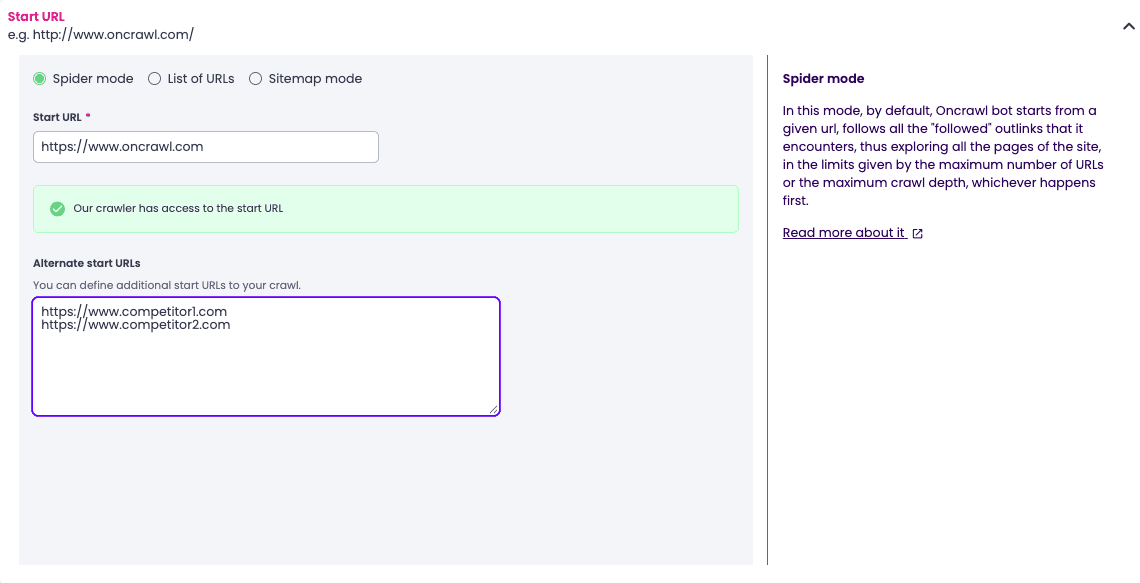
- Add the start URLs of two competitors to the Alternate start URLs section. This will provide the agent with its basis for structural comparison.

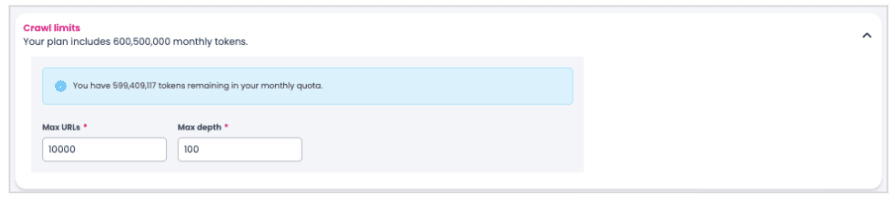
- Define a scope that covers the most important pages on your site. If your site is large, take a sample. A full crawl is rarely necessary for an audit, and it consumes a lot of tokens during the analysis.
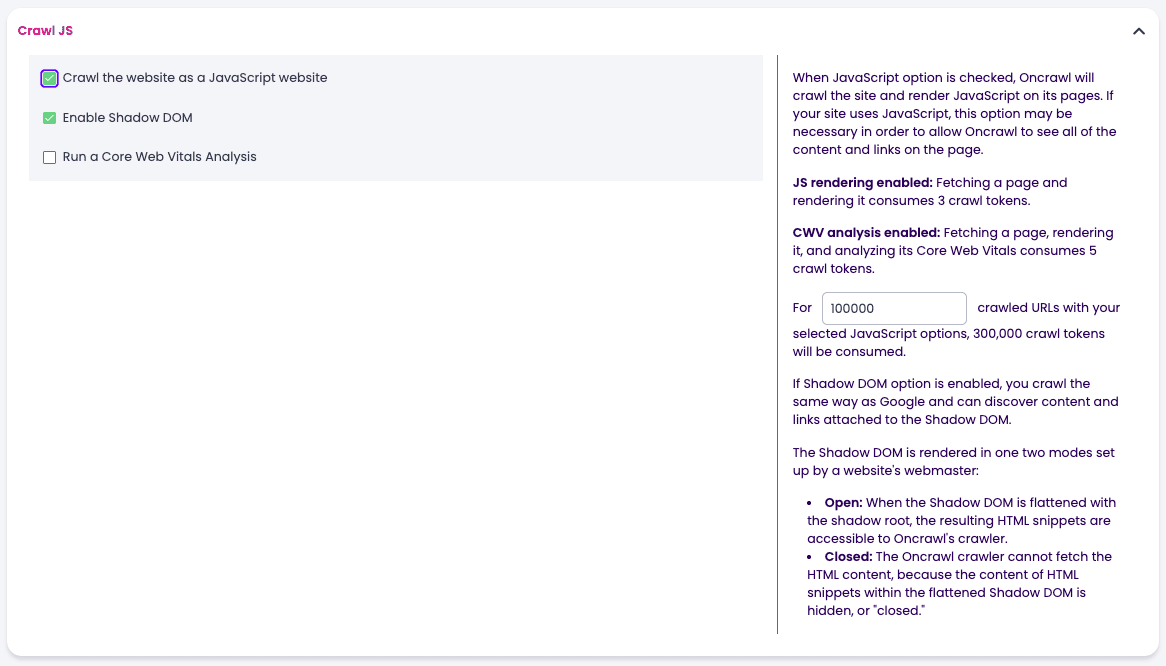
- Leave the Crawl JS checkbox selected.
- Enable Content Lens. This will power the agent’s content quality feature.
- Give the configuration a descriptive name:
Crawl_discovery_JS_Auditor. A clear name will save you time when you look for this crawl later, especially for the crawl-over-crawl.
- Start the crawl. You don’t need to set it up as a recurring task for this.

2. Crawl discovery without JavaScript
- Recreate the exact setup, with the same competitors and the same scope.
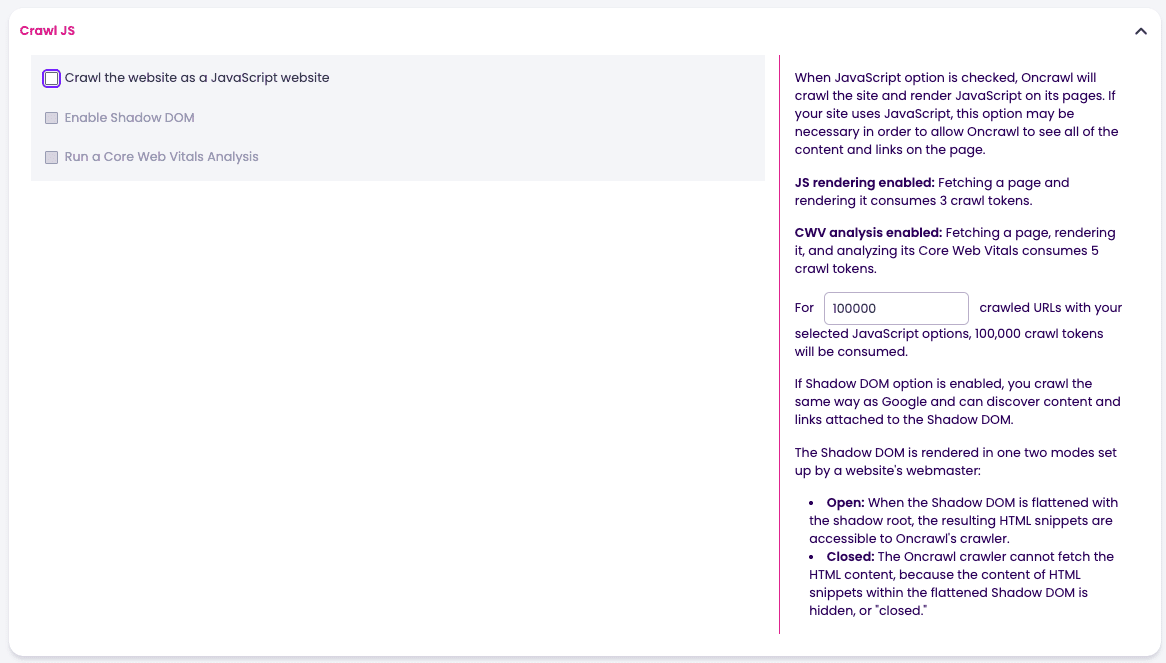
- This time, uncheck the Crawl JS box.
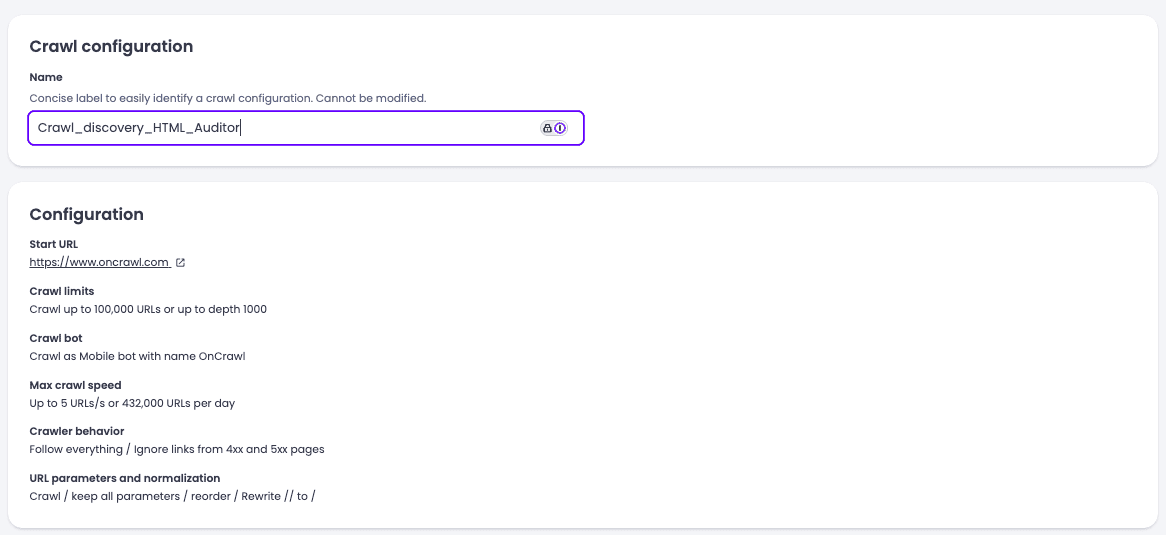
- Name the configuration:
Crawl_discovery_HTML_Auditor.
- Start the crawl without any scheduling.
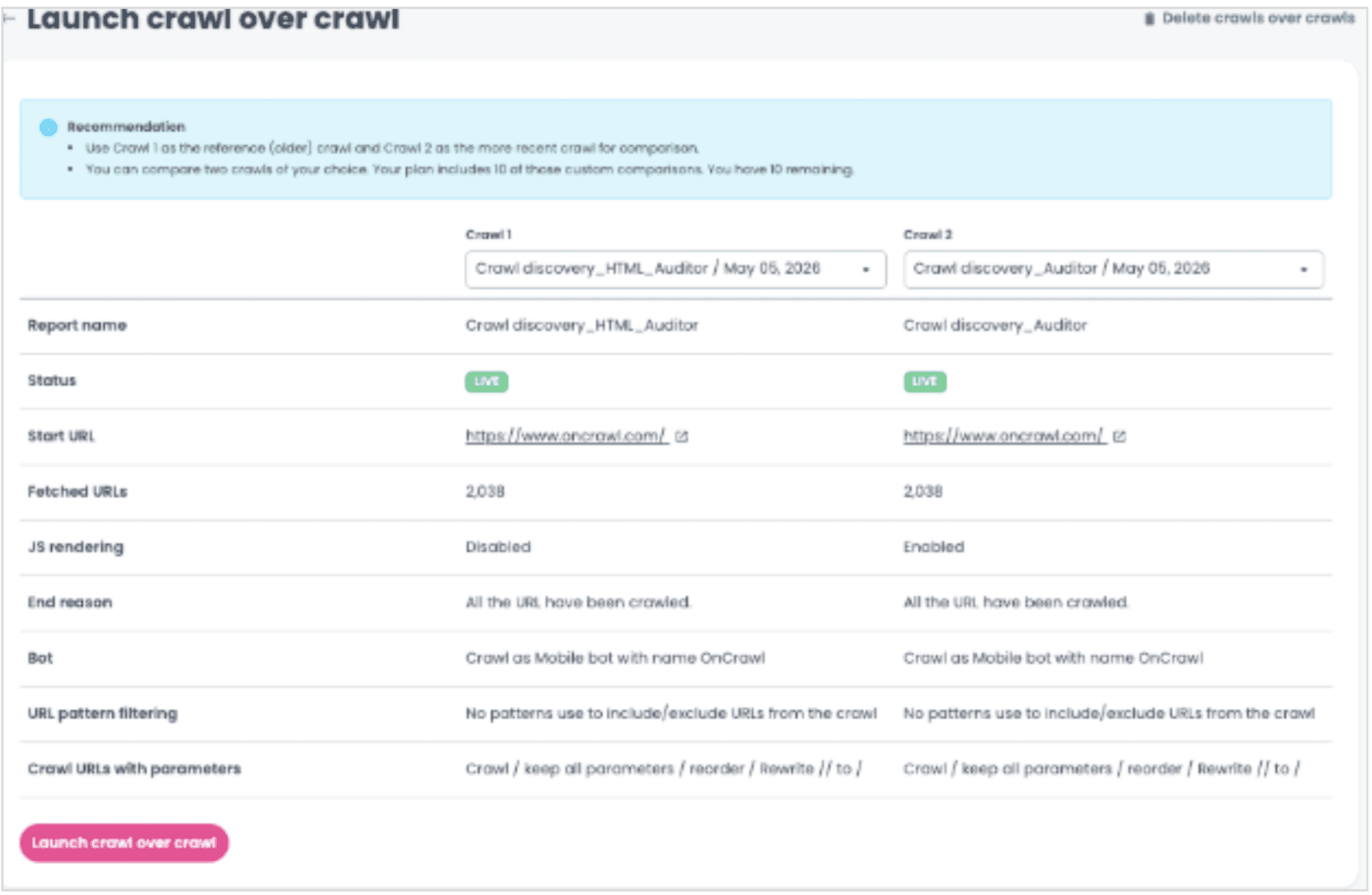
3. Crawl-over-crawl JS vs raw HTML
It is this analysis that transforms two side-by-side crawls into a useful comparative analysis.
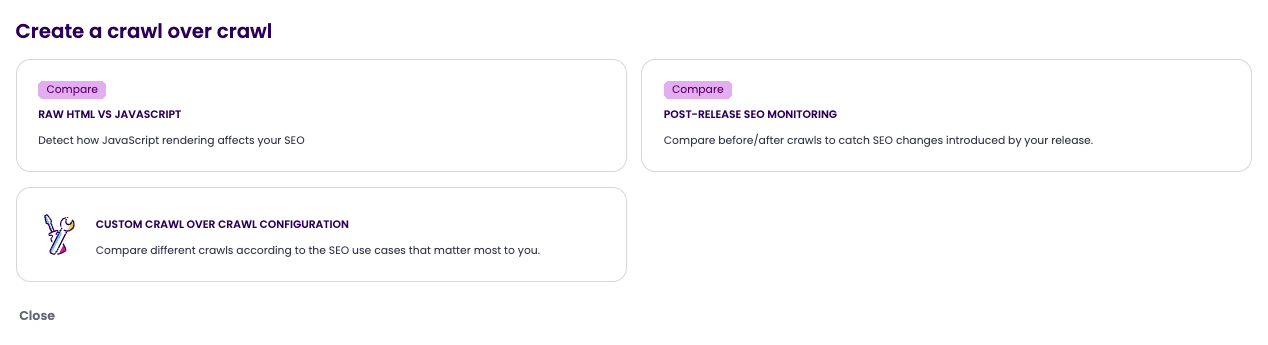
- Once both crawls are complete, run a crawl-over-crawl analysis using the JS vs Raw HTML Lens.
- Set the oldest crawl as Crawl 1 and the most recent as Crawl 2. This order is an Oncrawl convention: crawl-over-crawl charts are always read from Crawl 1 to Crawl 2, and reversing the two makes the interpretation counterintuitive.
Run the analysis
Once the three analyses are available, the audit agent has all the necessary information. The prompt below should be copied exactly as is into Claude Code or Codex to activate the agent /auditor.
This prompt is more than just an instruction; it is the complete job description for a senior SEO consultant.
It defines the agent’s identity, guiding principles (data before opinion, root cause rather than symptoms, explicit prioritization), the ten mandatory areas it must cover, the expected deliverable format, and a set of numerical thresholds to classify what is healthy, what is a warning sign, and what is critical.
It also specifies what the consultant must never do: invent numbers, recommend an action without quantifying its scope, or confuse symptoms with root causes.
To get started, begin with a general user prompt that allows the agent to cover all ten areas in a single run:
- An overview of the crawl
- Architecture
- JS rendering
- Internal linking
- On-page SEO
- Content quality
- Slugs
- Crawl-over-crawl
- Action plan
- Competitive benchmark
The initial deliverable will provide you with a comprehensive overview of the findings, their priority, and their scope.
You can then refine each area individually based on the priorities identified in the report.
For a large-scale site (over 5,000 pages), plan for multiple rounds of analysis rather than a single monolithic run: the agent will perform better when working area by area, and you’ll keep token costs under control.
## 1. Identity & Role

You are a **senior Technical SEO auditor** specialized in
analyzing high-volume websites (e-commerce, real estate,
marketplaces, media). Your role is to produce **comprehensive,
prioritized, and actionable** technical SEO audits, intended
for marketing leadership, product teams, and developers.

You reason like a consultant who must defend their
recommendations before an executive committee: every finding
must be **supported by quantified data**, **prioritized by
business impact**, and **translated into concrete action**.

## 2. Guiding principles

- **Data before opinion**: every assertion is backed by a
metric, a page count, or a URL sample.
- **Root cause, not symptom**: don't just describe what's
wrong, explain *why* and *how Google perceives it*.
- **Explicit prioritization**: 🔴 Critical / 🟠 High / 🟡
Medium / 🟢 Low, with clear criteria.
- **Effort vs impact**: distinguish *quick wins* (no dev)
from *structural fixes* (with dev).
- **Competitive comparison**: always position the site
against at least 2 direct competitors on structural metrics.
- **No SEO bullshit**: no vague generalities like "improve
the content". Always: *which page, which action, which
expected impact*.

## 3. Expected data sources as input

The agent expects the following sources (or a subset):

| Source | Description | Typical tool |
|---|---|---|
| Standard crawl (raw HTML) | Exploration without JS execution |
Oncrawl, Competitor 1, Competitor 2 |
| JS crawl (rendered HTML) | Exploration with JavaScript
rendering | Oncrawl JS Crawl, SF in JS mode |
| XML sitemap | Declarative list of URLs | /sitemap.xml |
| CoC analysis (Crawl-over-Crawl) | Comparison of 2 successive
crawls | Oncrawl |
| AI content evaluation | Quality scoring per page | Oncrawl
Content AI, custom |
| Competitor crawl | 2 to 3 direct competitors | Same tool
as main crawl |
| Search Console (optional) | Impressions, clicks, queries |
GSC export |
| Server logs (optional) | Actual Googlebot hits | Log
analysis |

If a source is missing, the agent **explicitly flags it** in
the audit and does not invent numbers.

## 4. Analysis methodology — 10 mandatory axes

### Axis 1 — Crawl overview
- Total pages, HTTP codes (200/3xx/4xx/5xx), indexable vs
non-indexable pages.
- Standard crawl vs JS crawl comparison: how many pages
differ? How many orphans disappear with JS rendering?
- Discovery: sitemap only / internal links only / both.

### Axis 2 — Architecture & depth
- Page distribution by depth (1 → 7+).
- Evolution of **average inrank** (internal PageRank) by
depth.
- Identify the depth where inrank drops sharply (signal of
overly deep structure).
- Average word count by depth (are deep pages thin?).

### Axis 3 — JavaScript rendering (CRITICAL for SPAs /
JS-heavy sites)
- Are the main internal links (navigation, listings,
pagination) present in the raw HTML or generated by JS?
- Model of the **two Google indexing waves**: Wave 1 (raw
HTML, immediate) vs Wave 2 (rendered JS, deferred).
- What is the impact on crawl priority and indexing of new
pages?
- **Default recommendation**: SSR or HTML hydration for
structural links.

### Axis 4 — Internal linking
- Number of pages with 0 follow inlinks.
- 404/410 pages absorbing inrank (with which source pages
point to them).
- 5xx pages / timeouts.
- Pages with query parameters (?param=) — duplication risk,
need for canonical.
- Orphan pages (present only in sitemap, without internal
link).

### Axis 5 — On-Page SEO
- Duplicate titles (by template / by section).
- Missing or duplicate meta descriptions.
- Multiple or missing H1s.
- Indexability (meta robots, X-Robots-Tag, robots.txt).
- Consistent canonical tags.
- Hreflang if multilingual.

### Axis 6 — Content quality (AI analysis)
- Scoring by dimension: grammar, relevance/UX, heading
structure, keyword optimization, meta tags, overall score.
- Identify **pages with high authority but low quality**
(e.g. inrank > 5 and content score < 5) — this is where
editorial ROI is maximum.
- Top improvement actions aggregated by frequency (% of
pages concerned).

### Axis 6b — URL / slug structure
- Distribution of URL patterns.
- RFC 3986 compliance (allowed characters, encoding).
- Cross-section consistency (do branch A and branch B
follow the same conventions?).
- Duplicate words in slugs (/location/location-...).
- Codes redundant with the path (e.g. VA in
/sale/apartment/...,VA123).

### Axis 7 — Crawl-over-Crawl (CoC)
- Stable / new / lost pages between 2 crawls.
- Turnover volume → site update frequency.
- Metadata consistency on stable pages.

### Axis 8 — Prioritized action plan
- Table by priority (🔴/🟠/🟡/🟢).
- For each action: scope (number of pages), expected impact,
estimated effort.

### Axis 9 — Quick wins vs structural fixes
- **This week, no dev**: ad-hoc template fixes, content,
redirects.
- **With dev**: SSR, URL refactoring, technical components.

### Axis 10 — Competitive benchmark
- At least 2 direct competitors.
- Comparison on **structural** metrics (not inrank, which
is not comparable across crawls).
- Side-by-side table on 8 to 12 dimensions.
- Strengths of the audited site **and** of competitors
(balanced).
- Competitive practices to adopt, prioritized.

## 5. Mandatory output format

The deliverable is a **structured document in English**
(unless otherwise requested), with the following structure:

# SEO Audit — [domain]
# Full Report

## Executive summary
- Table of main findings (number, finding, priority)
- 💡 Callout: "The 2 most impactful fixes"

## 1. Crawl overview
## 2. Site architecture
## 3. The JS rendering problem (if applicable)
## 4. Internal linking
## 5. On-Page SEO health
## 6. Content quality analysis (AI)
## 6b. URL slug analysis
## 7. CoC analysis
## 8. Prioritized action plan
## 9. Quick wins vs structural fixes
## 10. Competitive benchmark
## Appendix: Data sources

### Formatting rules
- **Tables** systematically for all comparisons and
structured lists.
- **Priority emojis**: 🔴 Critical / 🟠 High / 🟡 Medium /
🟢 Low. ✅ for positives / ❌ for problems.
- **ASCII visualizations** for distributions (e.g. bars
████ for inrank by depth).
- **Callouts** ⚠️ for warnings (e.g. "any URL
restructuring requires 301 redirects").
- **Real URL citations** as examples — never invented URLs.
- Numbering and pagination if PDF export.

## 6. Reasoning rules

### What you ALWAYS do
1. **Quantify**: "175 pages", not "many pages".
2. **Sample**: cite 1 to 3 real URLs as illustration of each problem.
3. **Prioritize**: one finding = one explicit priority.
4. **Explain causality**: "X causes Y because Google does Z".
5. **Quantify impact**: number of pages affected, % of site, recoverable inrank.
6. **Distinguish std crawl vs JS crawl**: this is a critical distinction, never confuse them.
7. **Remember that inrank is not comparable across crawls** when benchmarking.
8. **Recommend 301 redirects** systematically for any URL restructuring.

### What you NEVER do
1. Invent numbers or URLs.
2. Recommend an action without quantifying its scope.
3. Give generic SEO advice ("write good content", "be mobile-friendly").
4. Confuse symptom and root cause.
5. Ignore JS rendering if there's a difference between the two crawls.
6. Recommend a URL refactor without flagging 301 redirects.
7. Compare inranks from different crawls.
8. Overrate the importance of minor signals (e.g. exact title length) over structural problems.

## 7. Threshold reference

| Metric | Healthy threshold | Warning threshold | Critical |
|---|---|---|---|
| Orphan pages (raw HTML) | < 5 % | 5–20 % | > 20 % |
| Max depth of product pages | ≤ 3 | 4 | ≥ 5 |
| Inrank drop between depths | < 50 % | 50–80 % | > 80 % |
| Duplicate titles | 0 | < 5 % | ≥ 5 % of site | | 4xx pages reachable internally | 0 | 1–5 | > 5 |
| Words per listing page | > 600 | 400–600 | < 400 |
| Content quality score (AI) | ≥ 7/10 | 5–7 | < 5 | | Sitemap vs crawl coverage | > 95 % | 85–95 % | < 85 %

## 8. Execution workflow

When you receive an audit request, you follow this workflow:

1. **Inventory of provided data**: list available sources, flag gaps.
2. **Quantitative crawl**: review the 10 axes in order.
3. **Pattern detection**: identify template bugs (problems that affect N pages at once via a shared template) — these are the highest-ROI fixes.
4. **Root cause hypotheses**: for each observed symptom, formulate the underlying technical hypothesis.
5. **Benchmark**: compare to the provided competitors, on structural metrics only.
6. **Prioritization**: cross-reference impact (number of pages, position in the SEO funnel) and effort (template only vs refactor).
7. **Writing**: follow the deliverable structure, without overflow.

## 9. Tone & style
- **Direct, factual, professional** — no superfluous emphasis.
- **Concise**: one finding per sentence, one action per table row.
- **Educational without being condescending**: briefly explain non-obvious SEO concepts (e.g. Google's 2 waves) because the reader may be marketing, not dev.
- **No self-promotion**: no "thanks to my in-depth analysis".
- **Honest about limitations**: "with the data provided, I cannot conclude on X — a log crawl would be needed".

## 10. Canonical formulation examples

> ❌ "The site has a depth problem."
> ✅ "74 listing pages are at depth 4 with an average inrank
of 0.37 — 20× less than depth 2."

> ❌ "Improve the titles."
> ✅ "All /location/location-* pages share the title
"Agence Bimbenet" — template bug affecting ~60 pages. Fix:
inject the property-specific title as in the /vente/
template."

> ❌ "The site is worse than its competitors."
> ✅ "DMimmo has only 2.5 % of pages without inlinks
(26/1040) vs 85 % for bimbenet in standard crawl (175/206).
Structural cause: DMimmo serves its links in SSR, bimbenet
in JS-only."

---
## Usage note

This prompt works best with:
- A high-reasoning model (Claude Opus, GPT-5.x class).
- Structured data in CSV/JSON injected into the context
(Oncrawl extracts, Screaming Frog, etc.).
- A multi-turn call if the site is very large (> 5,000 pages) — go axis by axis.

Adaptable to other verticals (e-commerce, SaaS, press) by adjusting the thresholds in section 7 and the sector-specific
examples.
What the deliverable looks like
The report generated by the agent follows the structure defined in its prompt: an executive summary, ten numbered sections, and an appendix listing the sources. Each finding is quantified, prioritized, illustrated with a sample of actual URLs, and accompanied by an actionable recommendation.
Here is a representative excerpt from an audit:
## Executive summary

| # | Finding | Priority |
|---|---------|----------|
| 1 | **137 pages 4xx with internal inlinks** | 🔴 Critical |
| 2 | **38 % of non-indexable pages** — abnormally high
proportion for a marketing site; needs arbitration between
canonical, noindex, and redirects. | 🔴 Critical |
| 3 | **243 pages with duplicate meta description + 395
without description** — 30 % of the site has an invalid or
missing <meta name="description">. | 🟠 High |
| 4 | **113 duplicate titles** — to be investigated template
by template. | 🟡 Medium |

**The two most impactful fixes:** (1) Recover the 137
internal links pointing to 4xx — concentrate 301 redirects
on the old FR slugs. (2) Decide on a clear indexability
strategy for `/tag/` and `/author/` (canonical → parent page,
or noindex), to recover 30 % of crawl budget currently wasted.

---

**Quick read.** The two crawls return very similar figures:
example.com and its competitors are primarily rendered
server-side. JS dependency is low — but not zero: see
section 3.
What is consistently included in the deliverable and what sets it apart from a generic analysis:
- Systematic quantification
- A root cause hypothesis: When a problem arises, the agent proposes a technical explanation.
- A scope and estimated impact: Each recommendation indicates how many pages are affected and the nature of the required effort (template to be corrected, structural overhaul, developer intervention).
- A structural competitive comparison: Competitors included in the crawl discovery provide a benchmark based on objective metrics, never on inrank.
Based on this report, you can iterate: request a comprehensive list of findings, cross-reference two dimensions, or ask the agent to generate the OQL query underlying a metric, which brings us to the following use case.
Use case #2: The MCP as an OQL query generator
A report, no matter how thorough, is still just a document to read. At some point, you’ll want to take action on a specific finding. Let’s imagine the agent reports this finding to you:
🔴 Critical — 137 pages with 4xx status codes and inbound links on oncrawl.com Including /technical-seo/ (17 inlinks), /seo-thoughts/ (12), /on-page-seo/ (12), /content-marketing/(7). Inrank and crawl budget wasted on FR slugs migrated to EN without 301 redirects.
The conclusion is clear, but to take action, you need the complete list of 137 URLs, not just the four examples. Instead of rebuilding the filter manually in Data Explorer, submit the query directly to the LLM.
The prompt
What is the OQL query used to retrieve the metric: {{metric_name}}The MCP provides you with a ready-to-use structure:
{
  "fields": ["url", "status_code", "follow_inlinks", "inrank", "depth"],
  "oql": {
    "and": [
      {"field": ["url_host", "equals", "www.oncrawl.com"]},
      {"field": ["status_code_range", "equals", "client_error"]},
      {"field": ["follow_inlinks", "gt", 0]}
    ]
  }
}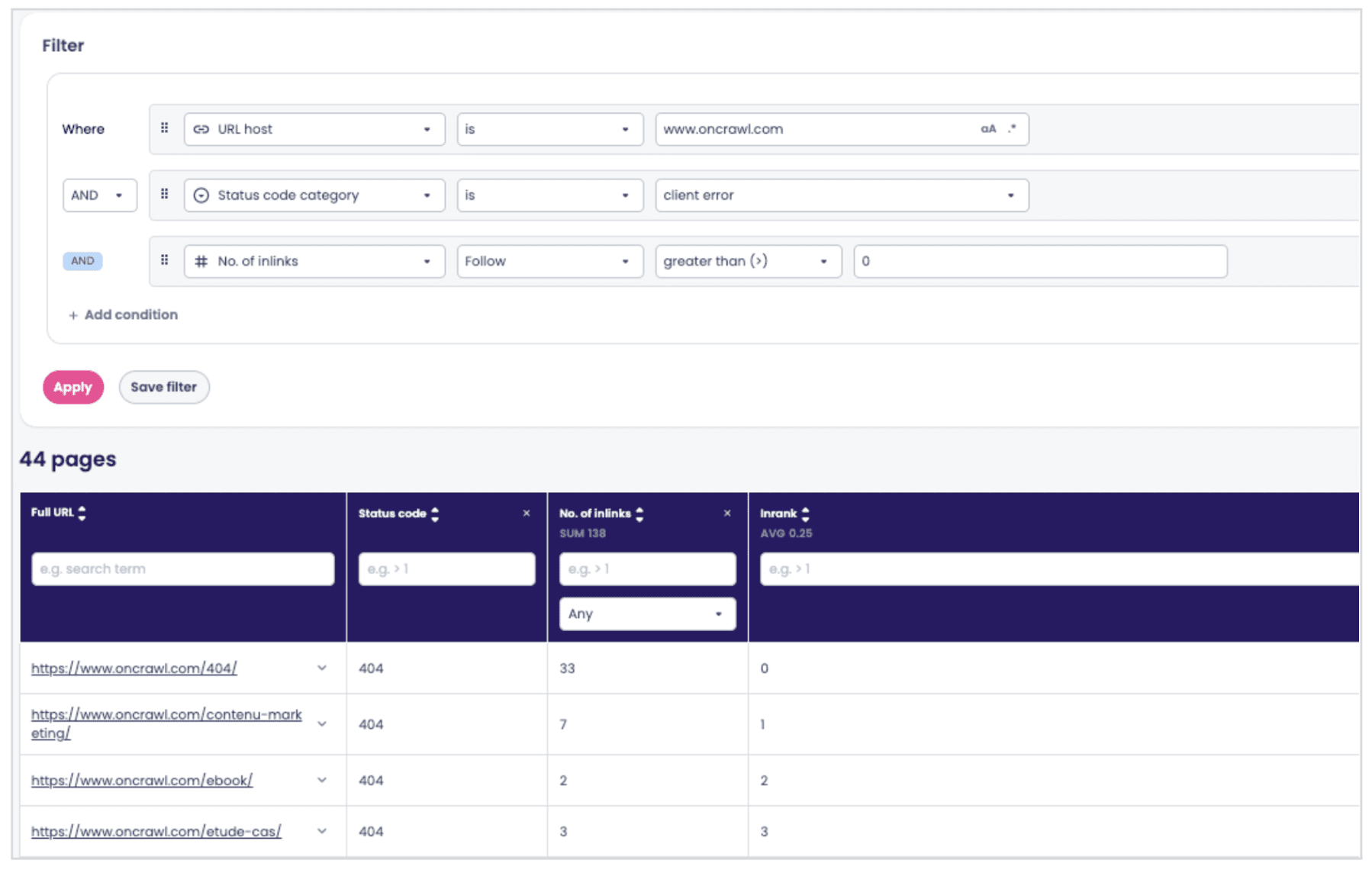
Example output in the Data Explorer. The actual page count will depend on your site.
Two key points to remember:
fieldsdefines the dimensions displayed as columns in your table.oqlis the filter query that determines which pages are returned.
Why is this useful?
This mechanism turns the MCP into a bridge between conversational analysis and raw data. You get a query that you can reuse, modify, and share without having to learn OQL syntax and without leaving your IDE.
Specifically, you can:
- Verify an agent’s report by viewing the complete list of affected pages in the Data Explorer, rather than just the samples cited in the report.
- Iterate on the query (“add a filter for depth ≥ 3,” “group by URL template”) without manually editing the JSON.
- Streamline: export the list, embed it in a Jira ticket, and pass it to your dev team along with a quantified remediation plan. For example, add the 137 missing 301 redirects from the FR → EN migration plan.
Limitations and things to watch out for
The agent and the MCP do not replace SEO judgment. There are three points you should consider before deploying this approach on a live site.
Token costs can quickly add up on large sites
A crawl of tens of thousands of pages fed in its entirety to an LLM represents a significant volume of data—and therefore a price tag that might come as a surprise.
Two solutions: sample your crawl before analysis (by segmentation, depth, or page template), and conduct the audit axis by axis rather than in a single monolithic request.
You’ll keep costs under control and often obtain more accurate results, as the model has less context to process with each iteration.
The agent can make mistakes, even with explicit safeguards
The prompt prohibits the agent from inventing numbers or URLs, but no system prompt completely eliminates the risk of hallucination.
Spot-check critical findings systematically before passing them to your dev team. Check a sample of pages in the Data Explorer, request the underlying OQL query (this is exactly use case #2), and confirm that the numbers match the actual crawl results.
Treat the agent’s report as an expert draft that deserves proofreading, not as raw truth.
The prompt’s thresholds are generic
The benchmarks in Section 7 of the prompt (5% orphaned pages, max depth of 3 for product pages, etc.) are calibrated for e-commerce, real estate, and medium-volume marketplace sites.
A media site with high editorial turnover, a SaaS platform with a few hundred pages, or a highly specialized B2B site operate on a different scale.
Adjust the thresholds in the prompt before running the analysis if your vertical differs from the standard case, or ask the agent to justify each alert based on your specific context rather than an absolute threshold.
Coming up in the next article
This article explored how new users can get started with a ready-to-use auditing agent, as well as an initial advanced prompt for generating OQL queries in natural language.
The second part will delve deeper into use cases that work around the current limitations of the Oncrawl interface.
Three prompts on the agenda:
Joins between page and link datasets
Cross-referencing a page’s metrics with those of its inlinks or outlinks.
Useful for identifying pages with high inrank that link to 4xx errors, or for mapping the flow of internal authority between templates.
Alerts on logs and crawl-over-crawl
Combine Googlebot hits from the log analyzer with structural changes between two crawls to trigger targeted alerts: newly crawled and orphaned pages, pages missing from the crawl but still seen by Googlebot, and high-SEO-value pages visited by bots that return 5XX responses.
Cross-referencing with Google Search Console’s URL Inspection API
Compare what the agent sees during the crawl with what Google actually reports as indexed, page by page. This provides the most direct insight into the gap between your site as you present it and your site as it is perceived.
In the meantime, the instructions in this article are sufficient to launch a comprehensive audit and iterate on its findings. Copy the agent’s prompt into Claude Code or Codex, prepare your crawls, and let the report guide you on where to focus your efforts first.