
In this article, we’ll explore what Schema.org structured data is, how it helps search engines better understand organizations and people, and how to use its different types and properties to provide clear, consistent information about your business.
What is E-E-A-T?
E-E-A-T stands for Experience, Expertise, Authoritativeness, and Trustworthiness. It is a framework Google uses to evaluate the quality and reliability of search results. While E-E-A-T is not a direct ranking factor, Google’s ranking systems look for signals that indicate content demonstrates these qualities, with trust being the most important.
Structured data can help search engines better understand your content, your organization, and the people behind it. For example, schema markup can clarify authorship and provide information about an organization.
However, structured data alone does not establish expertise or authority, nor does it guarantee higher rankings. Demonstrating E-E-A-T also involves publishing accurate, helpful content, providing reliable sources, and making relevant experience and expertise clear to readers.
E-E-A-T is particularly important for topics classified as YMYL, or “Your Money or Your Life”. These include subjects that could significantly affect someone’s health, financial stability, safety, or well-being.
For these topics, Google’s systems place greater emphasis on signals associated with strong E-E-A-T, making accuracy, reliability, and demonstrable expertise especially important.
You may be wondering:
What is structured data?
Structured data is information presented in a standardized format that can be understood by machines.
The internet needs structured data to exist. For all of its constituent machines to be able to communicate with each other, all of its protocols and languages (HTTP, TCP, TLS/SSL, PHP, Javascript etc) have a rigorous agreed-upon structure.
A huge exception to this is the information you put into the visible text content of your website pages. There are no rules governing how your data should be laid out. When search engines look at that content they analyze the chunks of text looking for things they can identify as particular types of data. But it’s always with a certain degree of uncertainty. For example, take a standard address such as :
Amazing Stuff Inc, 39 Main Street, 34000 Newtown, France
Humans from places that use this particular address format can instantly see that this is an address. But imagine you were someone from another part of the world that uses a different address format; would you understand what all the parts of the address were? This is what it is like for machines.
Artificial intelligence in search engines has developed to the point where it can recognize that this probably looks like an address, and extract the various elements, but it still is not 100% certain and needs corroboration from many other sources to feel confident about what it has guessed.
Structured data, however, is built of pairs consisting of a standardized name, such as “streetAddress”, and the value assigned to it (in this case “39, Main Street”), and search engines scan the html code looking for this type of named data.
The problem, therefore, is that although the information in your web pages may look structured to the human eye, it isn’t structured at all for machines. They have to guess!
In practical terms, what can we do about this?
Schema.org is part of an initiative launched in 2011 by Google, Bing and Yahoo to provide a system of universal schemas to enable structured data to be marked up in websites. When the search engines see the line “@context”:”http://schema.org/” they start looking for named Schema.org data pairs they can recognize.
We can insert Schema structured data into the <head> section of our html like this :
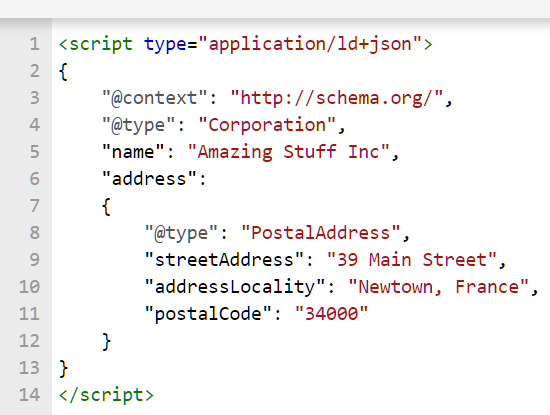
Structured data in JSON-LD format
And this is how the search engines see it when they analyze the page :
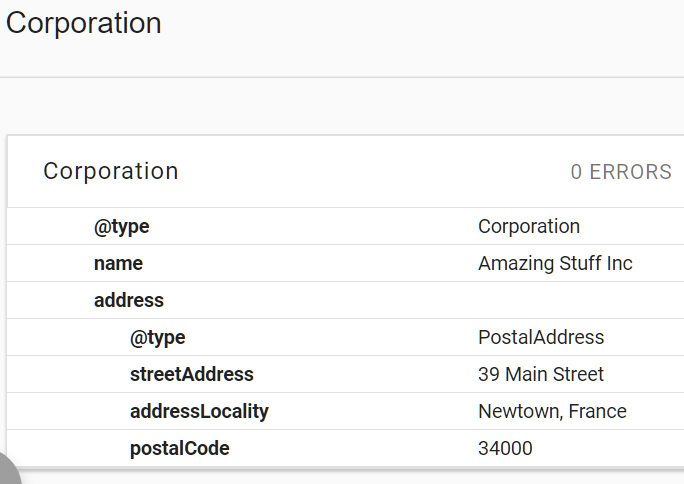
Structured data in Google’s structured data testing tool
Isn’t that so much clearer? Structured data makes it easier for search engines to identify and interpret information about your organization, its activities, and the people associated with it. While adding Schema.org markup doesn’t directly improve rankings or establish E-E-A-T, it can help Google better understand your website and, where applicable, make your pages eligible for enhanced search appearances.
The basic Schema markup for an organization
I’ll start with the most basic Schema and then look at some additional optimisations.
Firstly, you’ll need to define your type of organization. Because the Schema.org system is a hierarchy of things (which you can see here) called types, you can start at the most general type and go deeper into the hierarchy until you find your type. The most general type is Thing, containing a number of broad subtypes, one of which is Organization. As you can see in Figure 3, Organization contains other types like Corporation, LocalBusiness, EducationalOrganization etc.
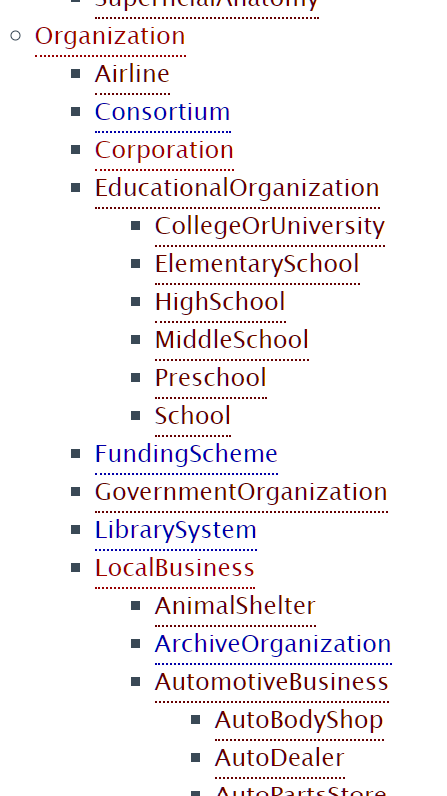
Part of the type hierarchy
You can see that LocalBusiness has a large number of subtypes, so you could continue digging deeper. But, it’s best to start by choosing the Schema.org type that most accurately describes your organization.
The general Organization type works for many businesses, but more specific subtypes, such as Corporation, OnlineStore, or LocalBusiness, may be appropriate depending on the organization’s activities. Google recommends using the most specific applicable type and including relevant properties that accurately describe your business.
Your Schema block would now look like this:
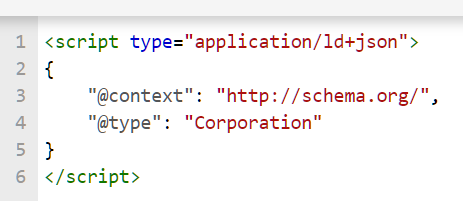
The Corporation type
This is great and doesn’t give us any errors in the Structured Data Testing Tool but it doesn’t tell us anything at all about the company, so we need to give it some attributes, or pieces of data that describe it.
On the Corporation page, you will see that it has a number of accepted attributes. It is important to spell the attribute names properly because once the search engine has seen the type it will look for the specific accepted attributes for that type. Attribute names start with a lowercase letter and type names start with an uppercase.
Some types have one or more required attributes: if you choose a LocalBusiness type (or a subtype of LocalBusiness) you may see errors displayed in the testing tool because it requires at least a name and an image url.
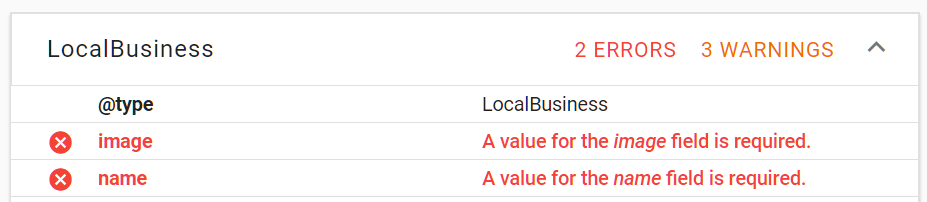
Errors for missing data
If this happens be sure to provide at least the required data as in figure 6 below, to avoid bad markup, and then you can add in extra data :
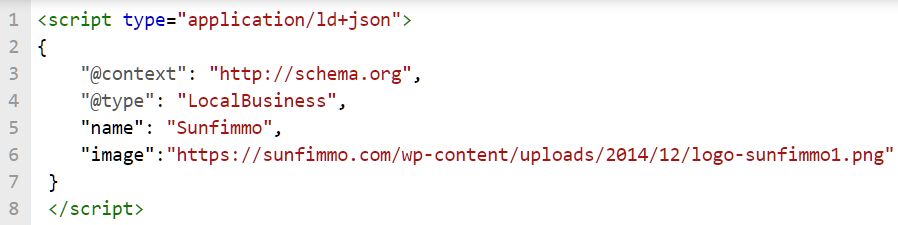
The errors are fixed
For the rest of this article I will take the example of sunfimmo.com, a company I have marked up in the past. It’s a French company but, remember, the attribute names are always in the standardized English form to be recognizable to the search engines.
The company is a real estate agency but they don’t have an actual physical agency you can visit, so they can’t be one of the LocalBusiness types. Instead of using RealEstateAgent their type has to be Corporation. The basic markup looks like this:
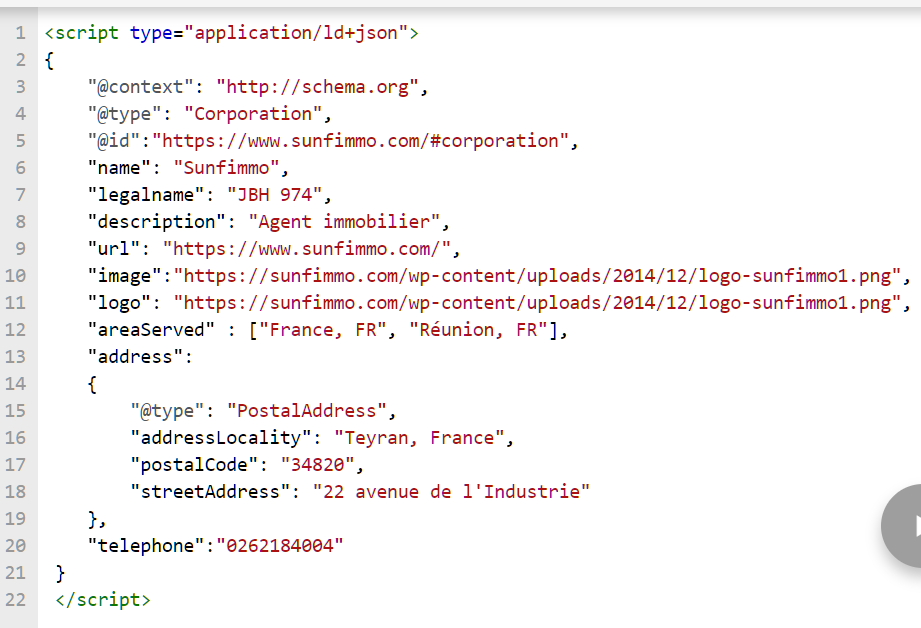
Basic Schema.org for a Corporation
We now have some good basic data about the company. Note that the legalname is not the same as the name used for trading – this is important because later we’ll be adding links to official company registration listings and the data needs to be the same if we want to build confidence in the exactness of the data. The same is true for the address and phone number; they need to be the same everywhere!
Contact Point
If a company has several contact points (in different towns, regions or countries) they can be marked up too. This company has two offices but they share the same telephone number so they are grouped together like this:
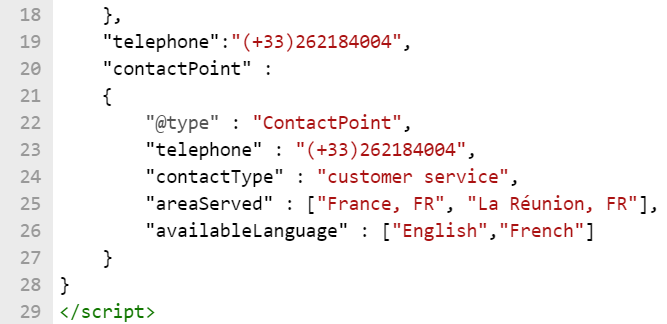
Basic Schema.org for a ContactPoint
Note that when a type (here it’s ContactPoint) is used as a value for an attribute it is marked up as a block in curly brackets; this is structured data! When an attribute has several values we can put them in square brackets, separated by commas.
Additional Schema markup for an organization
Additional type
You saw previously in the article that we can’t mark up the company as a RealEstateAgent because it’s not a local business but we CAN still show that it has the specific type of estate agent in a structured data format by using the Productontology system. I won’t go into detail now (the instructions are here) but it enables us to do this:

Using productontology
And we can also put a link to Wikipedia in a sameAs block:

Using sameAs
Linking to official pages for increased credibility
We now have markup with basic details of the company and have provided a more specific type. But remember that we also want to increase trust and credibility and show that the company is a real thing.
To do this we can link to official pages containing data that we cannot change ourselves, making them far more credible than, for example, social network accounts where basically anyone can claim to be anything they want!
Here in France, all companies have an official registration number (“SIRET”) and a code for the sector they’re working in (“CODE NAF”). So we can write a custom block that in effect says:
“This is an official identifier, here is what it is called, here is its value, here is a wikipedia page describing it and here is the official administration page with the listing”:
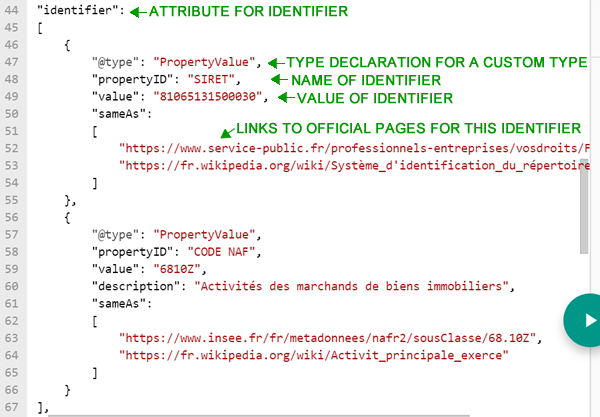
Using Schema.org identifier
To corroborate with further “official” information we can provide links to company information listings pages, along with any relevant active social accounts, in the sameAs block like this:
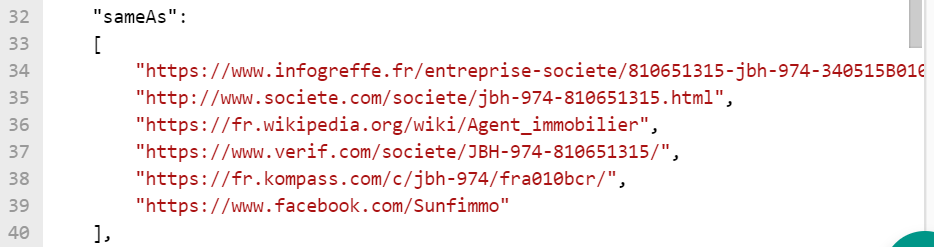
More sameAs links
Adding Schema data for a Person to increase expertise and authority
We’ve created our main block of Schema markup for Corporation and added a host of data to enhance its credibility and trustworthiness. A good way to increase authority and expertise (remember, this is all about E-E-A-T) is to include one or more people and what their credentials are. To do this we can include a Person block, like this:
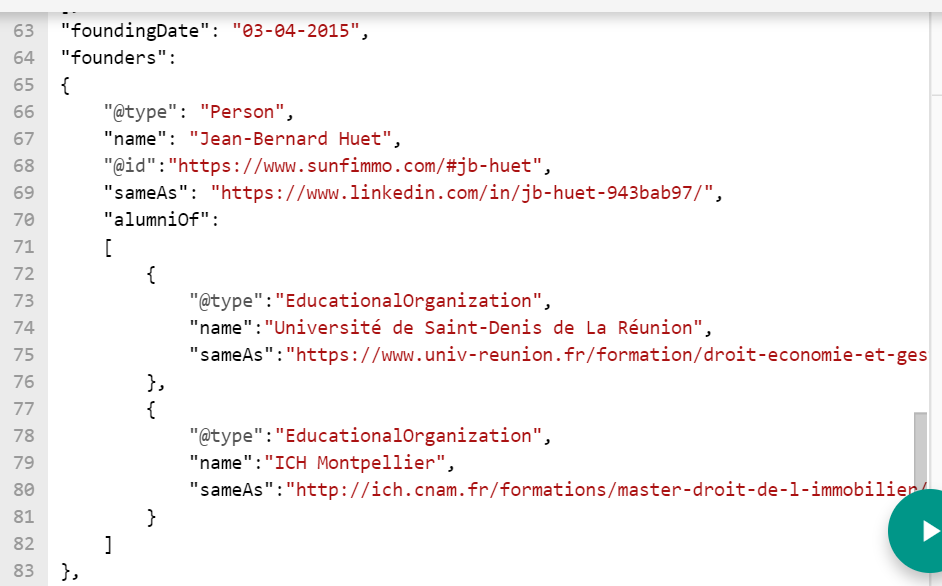
Schema.org for a person
Here we’re saying that the founder is a Person called Jean-Bernard Huet, then we provide his LinkedIn account and state that he is an alumnus of two EducationalOrganization with a link to the pages of the specific diplomas obtained, one in economics & business and one in real estate law. To enhance his professional credibility we can include an identifier block, like for the company, but this time defining his real estate agent licence number and linking to official pages that describe what it is, along with the official Chamber of Commerce listing page:
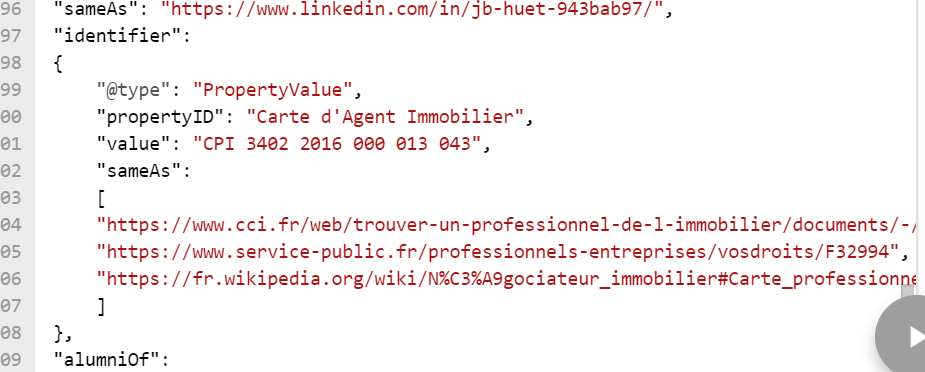
Schema.org identifier for a person
So, now we have provided a massive amount of very precise data to Google in a format specifically designed to be easily understood by machines!
The one problem is that our block is now huge and contains entities within entities that are not all necessary in all the Schema blocks on all the pages. Take the example of the Schema markup block for the founders attribute where we want to include the Person and all the information about them, but we don’t want to have to include the whole Person block every time.
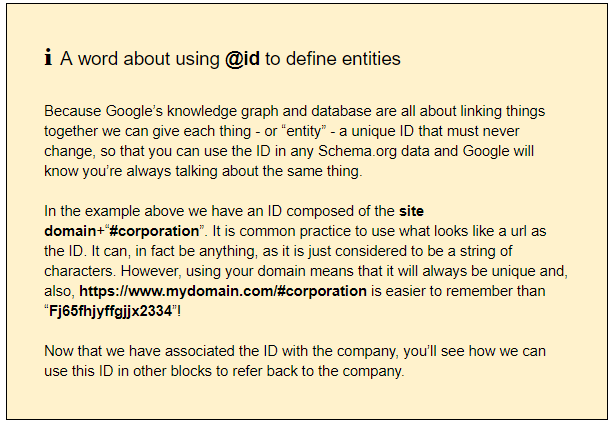
This is where the @id comes into its own: once we have defined the Person block with an @id we can include that @id in the founders block …

Schema.org @id for entities
… and Google will link the entities via the @id as you can see in the Structured Data Tool Tool:
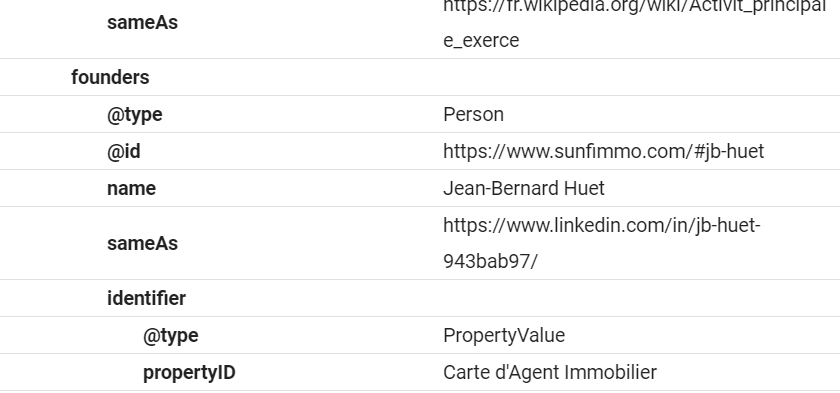
How google will see this block
How can we include several different Schema blocks in the same page?
To make the management of blocks more systematic you can put them as separate blocks into a container element like @graph and link them together using the @id, like this :
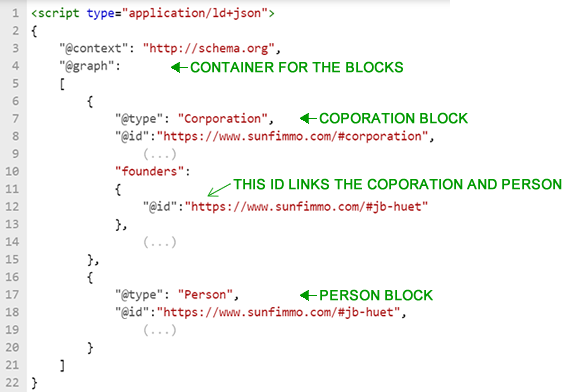
Using @graph for multiple blocks
By combining structured data blocks using @graph and connecting entities through @id, you can provide search engines with a clearer picture of your organization, the people associated with it, and the relationships between them. This helps search engines interpret your website’s information more consistently. While structured data doesn’t guarantee better rankings, it remains a valuable tool for communicating information about your business and supporting eligible search features.
A final word
Schema markup is a vast subject and we haven’t even looked at markup for products/services or blog articles, not to mention how we can mark up reviews and ratings in structured data to boost E-E-A-T, but these will be dealt with in future articles.
Have fun with your structured data and be sure to use the Structured Data Testing Tool!