
Googlebot does not crawl every page on your site every day. It works within a crawl budget, an amount of crawling resources it is willing to spend on your site based on factors such as your site’s popularity, server health, and how much demand Google has for your content. Within that budget, it decides which URLs matter enough to visit and how often to come back.
On a small site this rarely causes problems. On a large one it shapes everything. When you have hundreds of thousands of URLs and a limited budget, many pages wait days or weeks between crawls, and some may be crawled very infrequently or not at all.
A page that is not crawled cannot be updated in the index, so a price change, a new product, or a new article stays invisible until Googlebot finally gets to it.
The goal of crawl budget optimization is simple to state and harder to do: help search engines spend their crawling resources on the pages that earn you traffic and stop spending it on the pages that don’t. The same improvements also tend to benefit AI crawlers.
What is crawl budget?
Google describes crawl budget through two ideas that work together.
The first is the crawl capacity, the speed at which Googlebot can request pages without slowing your site down for real users. A fast, healthy server earns greater crawl capacity, while a slow or error-prone one earns less.
The second is crawl demand, which reflects how much Google wants to crawl your site at a given moment.
Popular URLs and pages that change often attract more demand. A migration, a redesign, or a wave of new content can push demand up for a period, then it settles.
Neither number is something you set directly. However, they can both be influenced through the quality of your architecture, the health of your server, and the signals you send about which pages deserve attention.
Where your crawl budget gets wasted
Wasted crawl budget is any crawling that Google spends on URLs that do not help you rank or convert. A few patterns account for most of it.
URL parameters and faceted navigation are the biggest offenders on large sites. Every filter combination for size, color, brand, or price can generate its own URL, and a catalog of tens of thousands of products can produce millions of near-duplicate pages. Googlebot crawls them, and most of them are worthless.
Redirect chains force Googlebot through several pages before it reaches real content and each redirect spends budget.
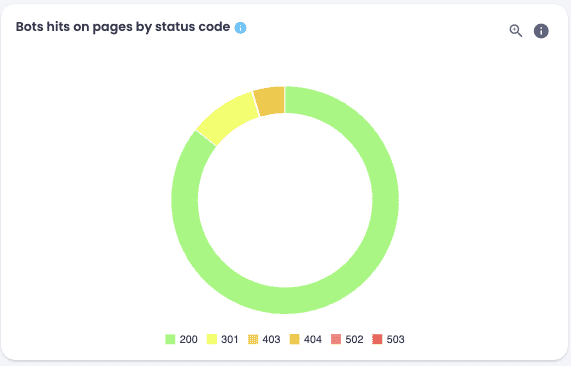
Soft 404s return a 200 status code while showing an empty or missing page, so Google may continue recrawling them because they appear to be valid pages. Low-value pages such as thin content, internal search results, and deep pagination pull in frequent crawls while contributing little.
Additionally, orphan pages, which have no internal links pointing to them, can continue being crawled if Google discovers them through backlinks, sitemaps, or previous crawl history.
There are also visitors you may not want to pay for at all. Server logs often show a large share of requests coming from bots that have nothing to do with your SEO, from scrapers to monitoring services, quietly consuming server resources that may indirectly reduce the amount Google is willing to crawl.
Why log files are the most complete and reliable source
You can’t fix waste you can’t measure and most crawl budget waste is invisible in the reports SEOs usually rely on. Google Search Console shows you aggregated crawl information rather than every individual request. It also does not let you segment crawling the way you need to.
Your server logs, on the other hand, do. A log file records every single request made to your server, with the URL, the timestamp, the user agent, and the response code. Nothing is sampled and nothing is aggregated away.
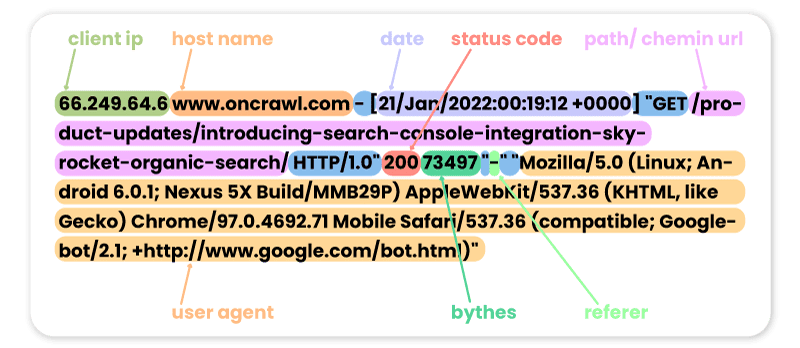
As John Mueller has put it, log files are underrated because they are the only source that tells you what Googlebot actually did, rather than what you hope it did.
Canonical tags and noindex directives describe what you want Google to do with a page, but only your logs reveal whether Google is following those instructions.
How to diagnose crawl budget waste
The real value comes from crossing your log data with a crawl of your site. On its own, a crawl tells you what your architecture looks like. On its own, a log file tells you where Googlebot has been. Bringing them together in Oncrawl lets you compare the two and see where they disagree, which is where the waste hides.
With both data sets connected, you can:
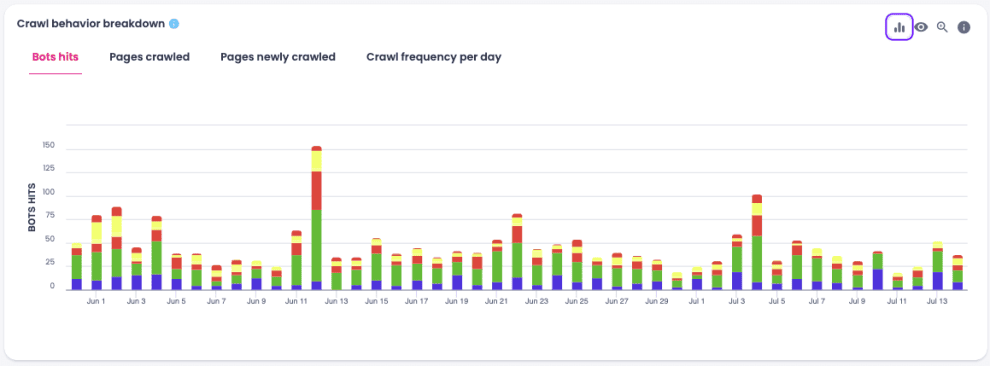
- See exactly which pages Googlebot visited, how often, and what share of your total pages ever get crawled at all
- Compare crawl frequency segment by segment, so you can see whether product pages, category pages, faceted URLs, and pagination are each getting the attention they deserve
- Find the pages that consume significant crawl activity while providing little SEO value, which is your priority list for cleanup
- Spot orphan pages that still receive crawl budget through old backlinks even though nothing on your site links to them
- Catch pages that Googlebot is crawling even though your own crawl marked them as non-indexable
Reclaiming your crawl budget reserves
Once you know where the waste is, you can reclaim it. Think of the crawling Google spends on useless URLs as a reserve you can redirect toward the pages that matter.
The fixes depend on what your data shows. Faceted URLs usually call for canonical tags, noindex, or robots.txt rules, chosen based on which filter combinations actually produce unique content.
Redirect chains get shortened to a single hop. Soft 404s get a correct status code. Orphan pages that still have value get linked back into your structure and the ones that do not get removed.
What matters is that you can prove the change worked. Because logs record everything, you can compare Googlebot’s behavior before and after a fix and watch Googlebot shift its crawling toward your priority pages.
A concrete example: Leboncoin
Leboncoin used Oncrawl’s log analysis to find which pages were eating crawl budget without contributing any traffic.
After segmenting its URLs and identifying the parameter combinations Googlebot was prioritizing, the team restructured its internal linking and adjusted its crawl directives so that Googlebot spent its time where it counted.
The time between publishing a page and seeing it indexed dropped from 45 days to 3.
Where should you start?
Crawl budget optimization is not a one-time project. Architectures drift, new parameters appear, and content grows, so the waste comes back if you stop watching.
The practical approach is to connect your logs, segment your site, and check regularly whether Googlebot is still spending its budget where you want it.
If you want to see how your own crawl budget is being spent, Oncrawl’s log analysis and crawl data give you the full picture in one place.