
“Is our website being cited by ChatGPT?” has to be one of the most popular questions we get from our customers at OMcollective these days. It is the new frontier of digital visibility, but many brands are currently measuring the wrong thing. Analytics tools only show a few referral clicks but are blind to visibility, and prompt tracking tools are simulated data at best.
To find the truth, we have to look at the server logs. Several months of testing and analyzing, and multiple discussions with Jérôme Salomon from Oncrawl prior to our BrightonSEO talks on this topic, have made it clear that many LLMs use identifiable bots for their retrieval process.
As Jérôme noted in his research for Oncrawl, bots like ChatGPT-User bot pull content in real time using a method called RAG (retrieval augmented generation).
The catch is that a bot visit does not automatically mean you were visibly cited in a response. The important takeaway is that the crawl is just the very first step in a rather complex pipeline. It is not proof of visibility, and it is certainly not a guarantee that a user will ever see your brand name.
To bridge the gap between a bot simply “seeing” your page and a human seeing it, let alone “clicking” it, we need a metric that accounts for the entire journey.
This is why click-through rate (CTR) is one of the most important metrics to measure your performance in AI search. It filters out the noise of the crawl and focuses on the actual business value generated. To calculate it accurately, however, we first have to clean up the data.
Getting signal out of the noise
If you look at your raw logs and simply count the rows where the user agent is ChatGPT-User, you are looking at a “noisy” metric. In our experience, raw counts can overstate actual content retrieval by as much as 40% to 60%. Log files are our best source of truth, but they require an approach that takes the data from “noise to signal” in order to be useful.
Status code noise
Not every bot visit is a success. If a bot hits a 404 page, a 500 error, or a 301 redirect, no content was retrieved for the LLM to process.
To get a clean number, you must only count 200 (OK) and 304 (Not Modified) responses. With Oncrawl’s AI Search Lens this clean-up is automatically done for you.
Session clustering noise
If you want to find out how many prompts you were part of the answer, you’ll also have to remove session clustering noise.
AI bots don’t browse like humans. They often crawl a page in rapid-fire bursts, so you might see five log lines from the same IP address for the same URL within one second. These are not five separate “retrievals” for five different users; they are a single visit event. To fix this, we recommend clustering visits from the same IP within a 5-second window into a single session.
On a recent project, one of our clients saw their “total visits” drop from 12,000 to 7,400 after applying these filters. This 7,400 represents the “clean” retrieval count, the real number of times your content actually entered the AI pipeline. While raw logs can be messy, this filtered data is the most powerful signal an SEO can own.
Retrieval does not equal citation: why visits are not impressions
Even after you clean your log files, you are still only measuring “retrieval.” This is where things get humbling for many SEOs.
A study by AirOps analyzed over half a million pages retrieved by ChatGPT across 15,000 different prompts. The results were startling: only 15% of retrieved pages were actually cited in a final response. The other 85% were essentially discarded by the model during the synthesis phase and will only be visible in the “More” section of the right hand pane.
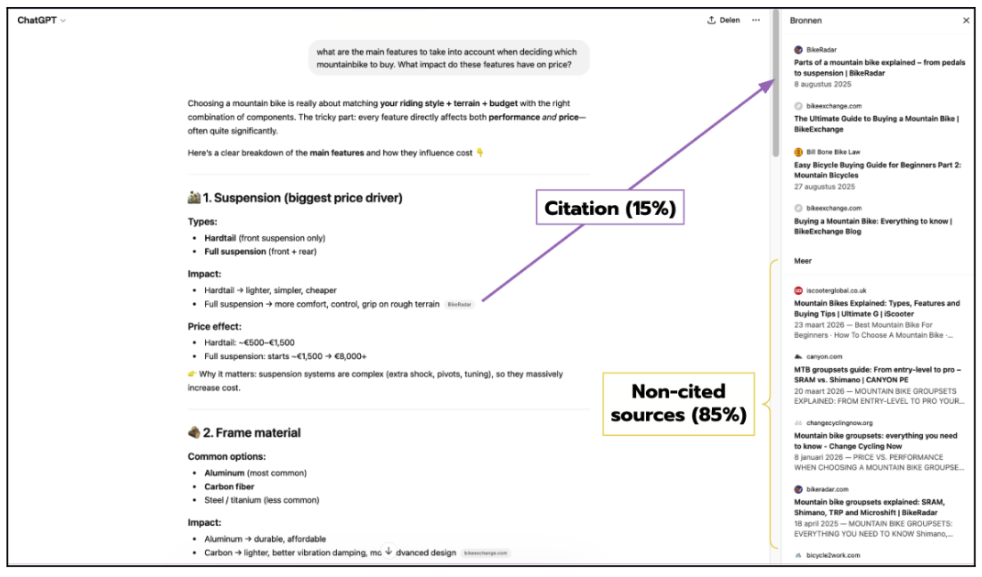
Figure 1: This visual shows the ‘More’ sources pane in ChatGPT. Notice how many links are hidden here/ These are ‘retrieved’ but not ‘cited’ in the main answer, leading to nearly zero CTR.
This happens because of a process called fan-out. When a user asks a question, ChatGPT might trigger multiple internal searches to find the best answer. It might pull 20 pages, compare them, and then only use the three most relevant ones to build the final response.
Optimizing purely for bot crawl volume is like optimizing for ad impressions without ever checking if the ad was actually shown on the screen.
It is a directionally useful metric, but it is strategically incomplete. If you are being crawled but not cited, you’re feeding the pipeline without getting the citation credit.
The next level metric: calculating your AI search CTR
To close the loop, we should calculate the CTR per page or topic. The formula is simple:
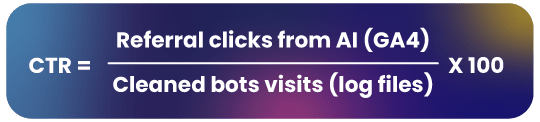
While our methodology focuses on ChatGPT, the current market leader, this framework can be applied to Claude or Perplexity by swapping the user-agent and referral strings accordingly (note: platforms like AI Mode do not use a retrieval bot, so they would need a different approach).
For Oncrawl users the AI Search Lens will do this calculation for you. If you want to do the calculation yourself, you will need to follow these steps:
Step-by-step manual calculation
- Export logs: Filter for “ChatGPT-User” and remove any non-200/304 status codes.
- Cluster: Group rows with the same URL and IP address within a 5-second window.
- Fetch GA4 Data: Export a report showing “Session source” filtered for chatgpt.com.
- Join: Use a VLOOKUP in Excel to match the URL from your logs to the URL in your GA4 report.
- Divide: Apply the formula above.
Why placement matters for your CTR
When you look at your results, you will notice that CTR varies enormously between pages, even when retrieval volume is identical. The single biggest factor is not content quality or domain authority: it is where your link appears in the ChatGPT interface.
Data surfaced by Vincent Terrasi and reported by Search Engine Land breaks down performance across every placement zone. The file tracks impressions and clicks across the response, sidebar, citations, search results, TL;DR, and fast navigation surfaces, along with a CTR calculation for each.
The headline finding from that report, that the sidebar and citations placements carry a CTR of 6–10%, is technically accurate but dangerously incomplete. It is the kind of stat that travels well on LinkedIn but collapses under scrutiny.
Here is the problem. That 6–10% figure only measures clicks among users who were already shown the sidebar. It says nothing about how often the sidebar actually appears.
When you look at the full picture from the same dataset: 185,450 total turns for a single high-ranking URL, the sidebar was shown in just 720 of them. That is an exposure rate of 0.39%.
Do the math: 6.25% of 0.39% gives you a total effective CTR of 0.024%. Not 6%. Not even the 0.06% estimate that has circulated in some commentary. Less than three clicks per ten thousand turns.
Applied to the actual data that is shared in the original post, the picture looks like this:
- Response (inline citations): CTR goes up to 2.08% according to our calculations. According to the article, the highest CTR is 1.68%. It is however safe to say that most CTRs will be under 1% as well.
- All other placements (sidebar, citation panel, …): 0.024% max but often even lower (0.016% or just 0%)
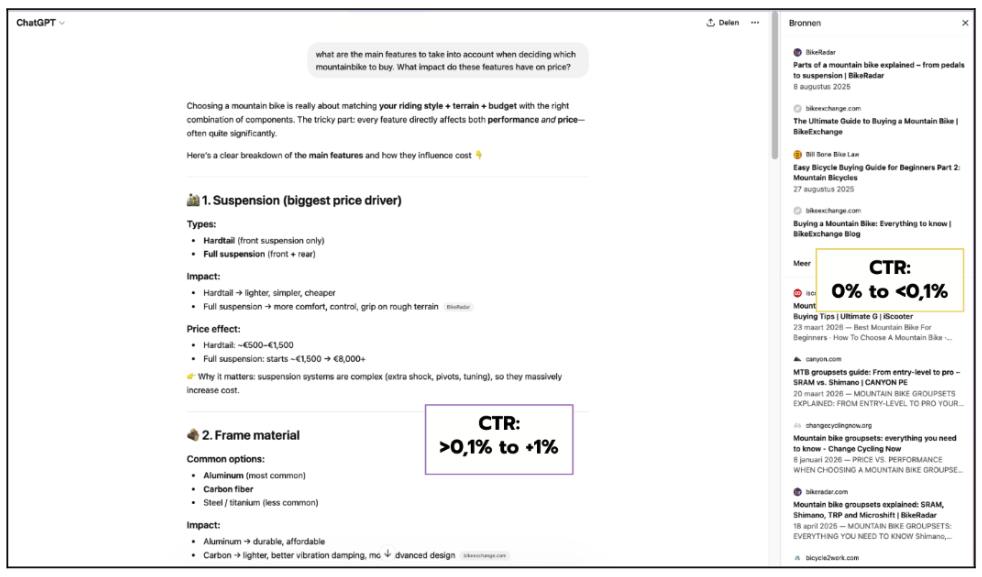
Figure 2: An example of an ‘Inline Citation’. Our data shows these are the primary drivers of traffic, whereas the ‘Sources’ in the right hand pane has significantly lower visibility.
So, in reality, nearly all real-world clicks come from inline citations in the main answer. For those placements, a minimum CTR of 0.1% is a safe benchmark, with some pages exceeding 1%.
Reading the results: The Four-Quadrant Framework
Once you have your data, you can map your content into this 2×2 matrix to prioritize your strategy.
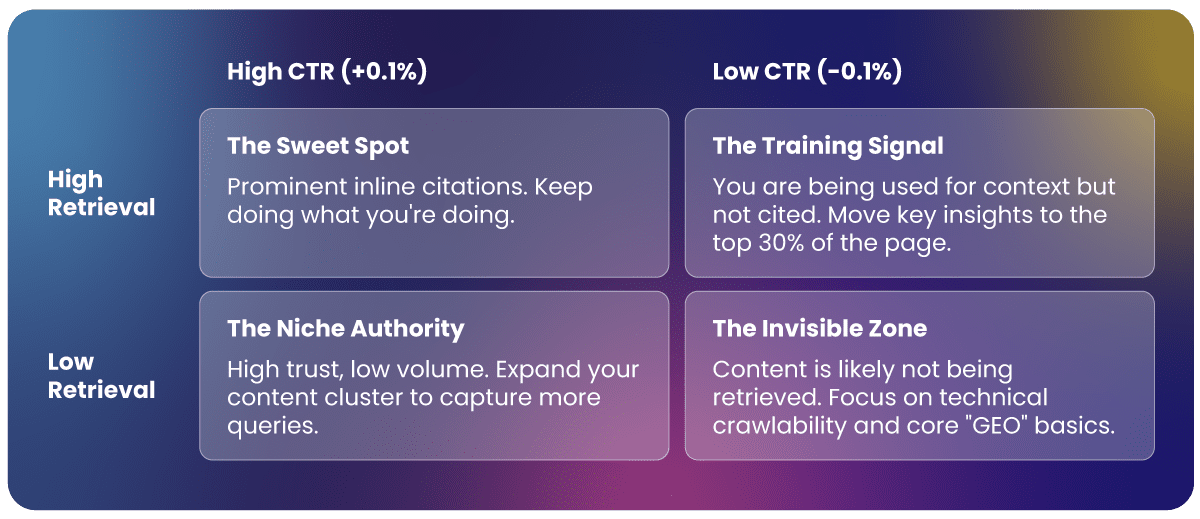
High retrieval, high CTR (+0,1%). Your content is being cited inline, prominently, in responses where users are genuinely curious enough to follow the link. This is the ideal state. It often correlates with content that makes a bold, specific claim early, gives a clear answer, and leaves the user wanting more detail than the AI can comfortably summarize.
High retrieval, near-zero CTR (-0,1%). Your content is being retrieved, but your link is landing in the sidebar rather than the response body. These pages are providing free training signals without generating business value. The fix is to audit whether your most important insight is in the first 30% of the page: research indicates that roughly 44% of ChatGPT citations come from that opening section, so content buried below the fold may be retrieved but never quoted prominently enough to earn an inline citation.
Low retrieval, high CTR (+0,1%, often +1%). A narrow niche where you have real authority. When you appear, users click. This is often seen in deep technical guides or specialist “how-to” content where the AI answer is a useful entry point but not a substitute for the full piece. The strategy here is to expand retrieval: more content on adjacent questions in the same cluster, without diluting the authority that is driving clicks in the first place.
Low retrieval, low CTR. You are largely invisible to the AI pipeline. This is the starting point for most sites and the clearest signal that content, structure, or crawlability work is needed before any “GEO” optimization makes sense.
Getting started: tools and approaches
How you start working with this data, depends on your tool stack and technical appetite:
- The DIY method: Use Excel or Google Sheets. It is manual, but for a smaller site, it is the best way to get a feel for the data.
- The AI-assisted method: If you aren’t a developer, you can use an AI assistant to write a Python script that automates the 5-second clustering and merging process for your GA4 and log exports.
- Dedicated tooling: For teams that need to do this at scale every week, manual merging becomes a headache. Oncrawl’s AI Search Lens was built specifically for this. It handles the bot visit cleanup, merges the referral signals, and calculates the CTR automatically. It essentially turns a three-hour manual task into a real-time dashboard.
Final thoughts
AI search is still difficult to measure, but it’s no longer the black box people say it is. By calculating your real AI search CTR, you move from guessing about visibility to knowing exactly which content is actually driving traffic.
I recommend starting small: pick your top five most-crawled pages and run the manual calculation for the last 30 days. Stop optimizing for bots that don’t talk back; start optimizing for the citations that actually move the needle for your business.