Technical SEO has a direct line to revenue, but not every website needs a dedicated technical pipeline to succeed. Content and technical SEO are separate disciplines: they need different skills, run on different workflows, and are measured in different ways.
This article focuses on where technical SEO moves the numbers most, which is e-commerce. Large stores depend on a healthy tech stack in a way that a B2B site running on blog posts and landing pages usually doesn’t.
That doesn’t make technical SEO an e-commerce-only concern, but it is where the impact is easiest to see.
I will walk through five areas where technical work changed my clients’ revenue, with real examples and a framework you can apply to your own site.
To set the scene, here is how the impact of technical SEO scales with site size, in a graphic by Aleyda Solis based on a Mark Williams-Cook chart:
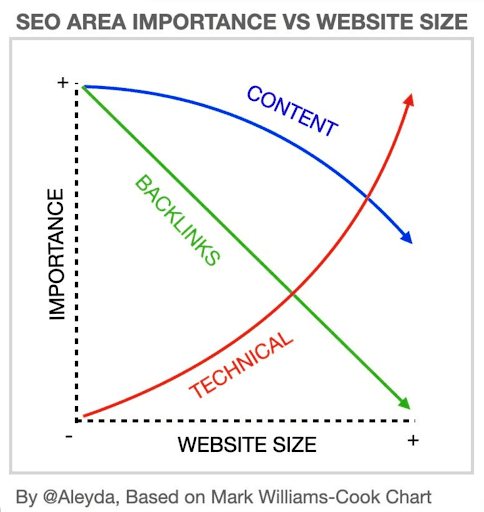
Source: aleydasolis.com
The economic impact of technical SEO is double
Since LLMs entered the marketing pipeline, technical SEO matters more than before and on two fronts.
We usually think about ROI in terms of our own business, but there is a second return to consider: the cost to crawlers of fetching our pages. A site with 100,000 pages is far more expensive to crawl than one with 1,000.
To see how expensive data has become, all you need to do is look at Forbes reporting that Google’s data center buildout could top $1 trillion. The AI boom drove much of that spending and those data centers are where our content actually lives.
To put it plainly, every page on your site costs Google, and every other tech company, money to crawl and store. Few people say it out loud, but “cost per page” behaves like an unwritten ranking factor.
A high page count is not a problem in itself. As long as those pages serve Google’s users, the return stays positive. The problem is waste.
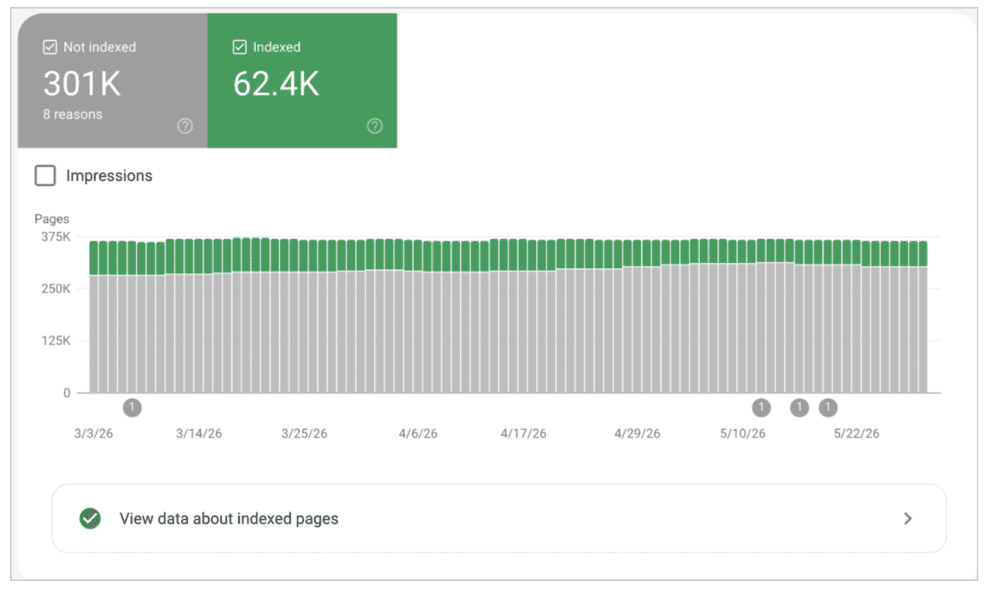
Take the site behind that report: 80% of its pages are useless to Google’s index. Google still has to crawl, fetch, and evaluate every one of them, at a cost and for no benefit.
The signal that sends is poor quality at high cost, which is a bad return for Google and eventually a bad return for you.
The five steps below are how you make your site a positive return for Google, for AI crawlers, and for your own business.
1. Crawl budget efficiency
The goal is simple: let crawlers reach as many valuable pages as possible in the shortest time. Say Google reports a crawl rate of 8,000 pages per day and your site has 1 million pages. A single full crawl would take 125 days, roughly four months. That is unacceptable if you update content regularly, whether that is stock, prices, reviews, or product details.
The catch is that crawlers revisit good and bad pages alike, regardless of quality.
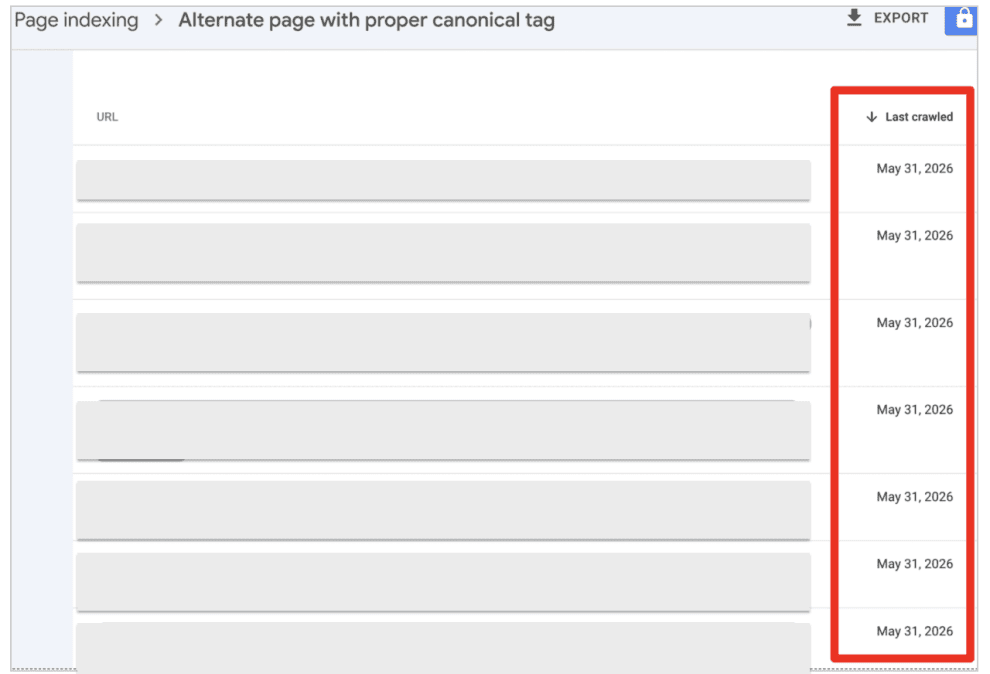
When too many of those 8,000 daily crawls lead nowhere, Google draws a conclusion: this site rarely improves my index, so I will come less often to save money.
Google can lower your crawl budget and that is a real risk. A site that is not worth crawling will not be indexed or ranked well either.
Let’s look at that through the frame of a real case study from my colleague Patryk Wawok:
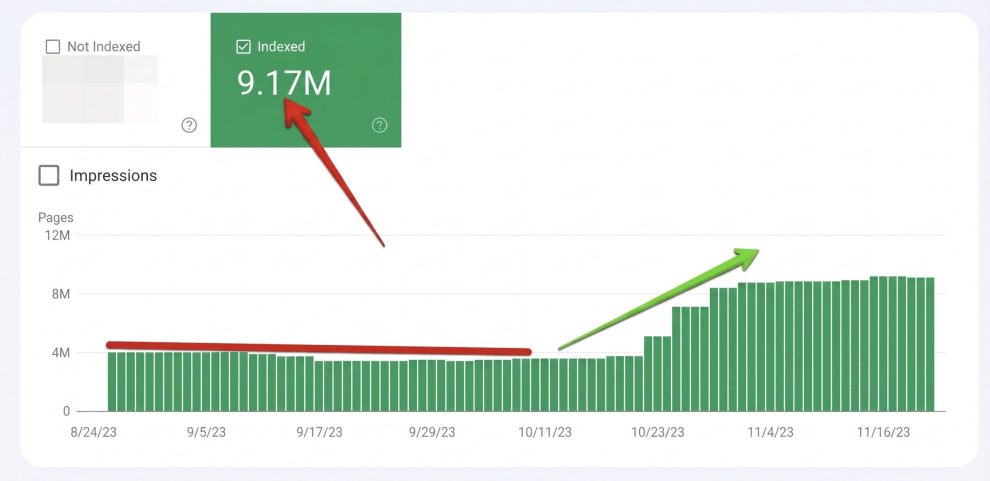
- Context: a Fortune 100 heavy-machinery parts provider with a sitemap of 40 million URLs.
- Starting point: a crawl rate of 8,000 pages per day, meaning Googlebot would need about 13.7 years to crawl the full site once (40,000,000 / 8,000 = 5,000 days).
- Fix: resolving JavaScript rendering issues and server-side bottlenecks lifted the crawl rate to 1.2 million pages per day.
- Result: the full crawl cycle dropped to 33 days, contributing to 400% traffic growth over two years.
2. Optimal server response is optimal revenue
A quick detour. You might expect Core Web Vitals or Time to First Byte here. Instead, I will use a negative SEO example to show how server response ties directly to revenue.
The technique in this case is a form of cache-busting, which is the closest name I could find for the attack.
An attacker weaponized my client’s own infrastructure. They injected thousands of random, fake parameters into core URLs across the site, targeting pages like:
The attack came from two directions:
- Fake crawlers hammering the server for these pages by the thousands
- Google finding the same fake links planted on link farms
The server goes down
The cache flooded with dozens of malicious requests per second and broke. The database became inaccessible and both the back office and the front end returned 500 errors. The site was down.
Quality bleed in Google
Googlebot followed those thousands of spam links home from the link farms and began logging the junk parameter pages by the hundreds of thousands.
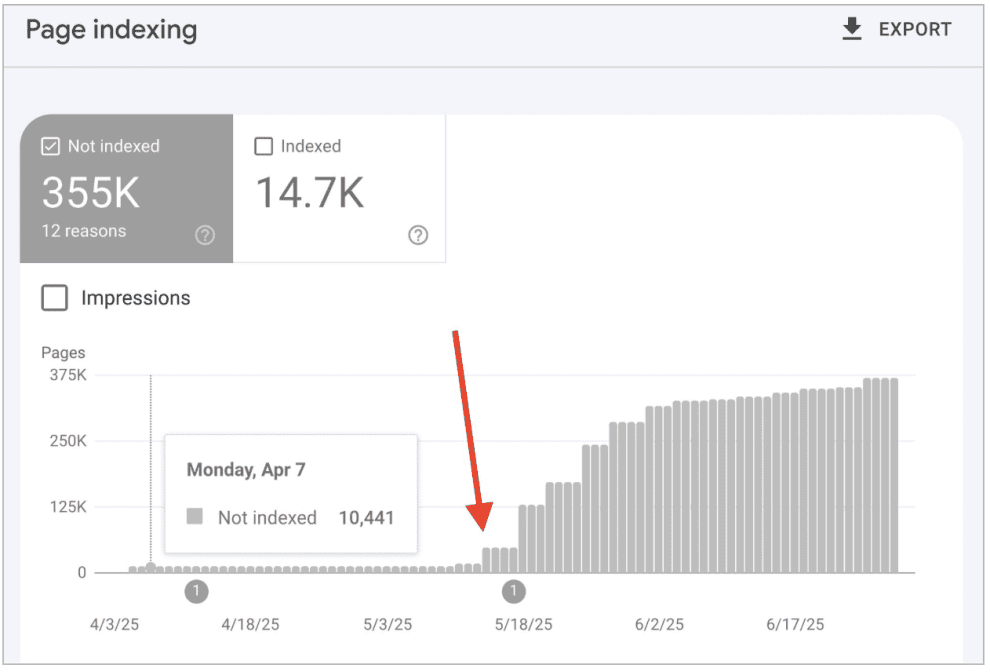
To Google, the site looked like it was flooding the index with an endless amount of useless pages. The overall quality signal collapsed, rankings fell within days, traffic dropped by 60%, and revenue fell by 40%.
A two-layer shield
The setup was not ideal: a shared server running WordPress and WooCommerce. So, we added two layers of protection:
- Cloudflare WAF: block the fake parameter (?k=) at the network edge, so the attack dies at Cloudflare and CPU usage on the vulnerable shared server stays at zero.
- .htaccess safety net: a 410 Gone rule for that exact parameter string. If the attacker bypasses Cloudflare and hits the origin IP directly, Apache kills the request before WordPress has to serve it.
The attack stopped affecting us, though Cloudflare logs showed a few more attempts before the attackers gave up.
3. A faster site means more revenue
A note on terms: I use “fast,” “CWV,” and “speed” as shorthand. What I really mean is user experience.
I once read a Google representative claim, roughly, that site performance (Core Web Vitals) matters, but not for SEO.
Site performance (Core Web Vitals) matters but not for SEO…
The implication is that user experience matters, but somehow not for SEO. I could not disagree more. User experience is part of SEO and AI search. Once users land on your site, they still need to want to buy something for any of the search marketing to pay off.
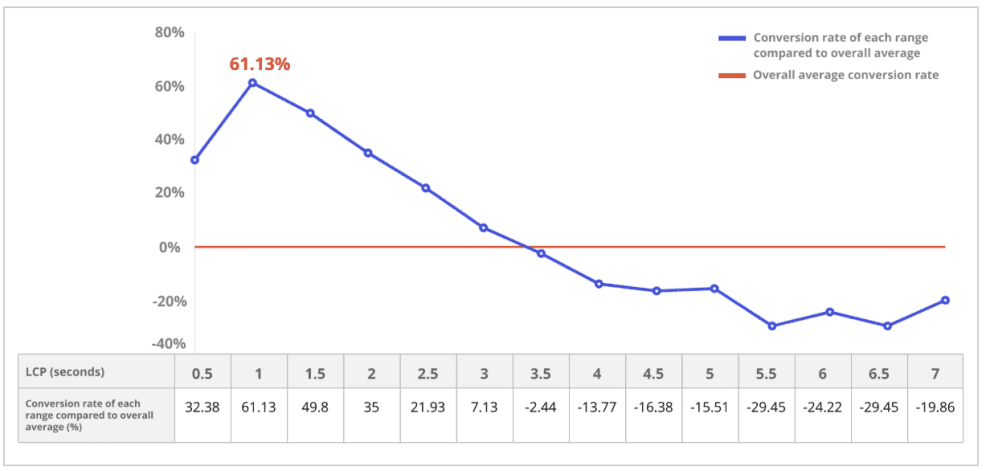
Too many people still treat SEO as rankings and traffic alone. Organic search is a business channel. You can rank both a slow site and a fast one, but the slow site converts worse.
A study by Salt Agency found that pages delivering an LCP of 2.5 seconds or less were 1.47 times more likely to appear in AI outputs than slower pages. So speed is not only a conversion lever, it affects rankings and visibility too.
Mobile revenue up 42% with better Core Web Vitals
To see the line between speed and cash, let’s look at the case study of the refurbished-electronics retailer, Swappie. Their mobile conversion rate was only 24% of their desktop rate, against an e-commerce benchmark closer to 50%.
If desktop converts at 2%, mobile should sit near 1%. Swappie’s mobile users converted at 0.48%, about half what you would expect.
Rather than buy more ads, they rebuilt their front end:
- LCP down 55%: shifted core rendering from client-side to server-side.
- CLS down 91%: removed shifting layout elements on mobile.
- Lighter assets: aggressive code-splitting and removal of unused CSS and JavaScript.
The results:
- Mobile revenue: +42%
- Relative mobile conversion rate: +10 percentage points (24% to 34%)
- Total page load time: -23%
4. Match server logs to business goals
Most SEOs spend the bulk of their time in Google Search Console. It is indispensable, but it is a filtered, delayed, and heavily sampled view that tells you what Google chooses to show.
For the ground truth of how search and AI crawlers actually interact with your site, you need your raw server logs.
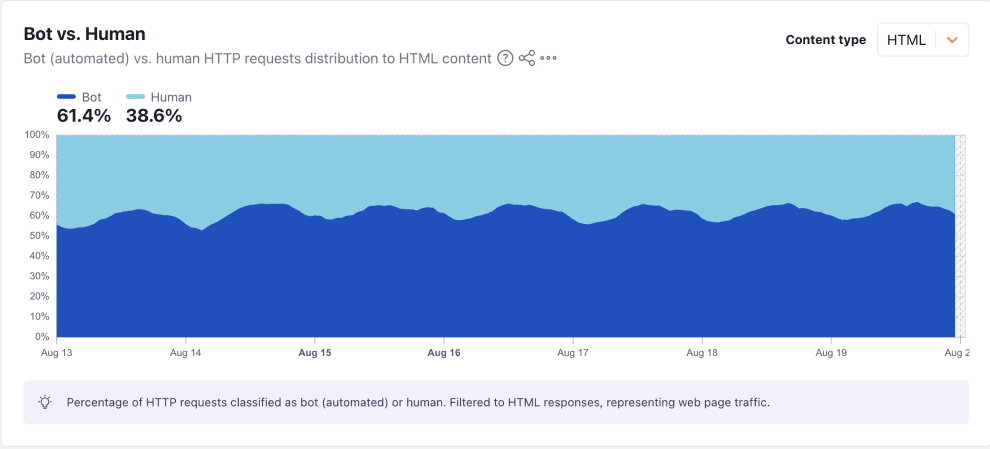
Bots, not people, reach your site first. They now make up more than half of HTTP requests to HTML content, according to Cloudflare.
I will not cover log analysis from scratch, since plenty of articles do that, and log analyzers make it much easier.
Tip: Oncrawl’s Log Analyzer handles this well. Here are five issues worth hunting for in your logs.
Orphan pages
Map your log URLs against a fresh crawl. If bots hit a URL that has zero internal links in the crawl, it is orphaned.
How to fix it:
- If it has business value, link to it internally.
- If it is low value, serve a 301 redirect or a 410 Gone.
The most useful orphan report shows pages with Googlebot hits or organic visits but no internal links. You can build it by combining your logs with your crawl data. I use Oncrawl’s AI Assistant to pull it directly.
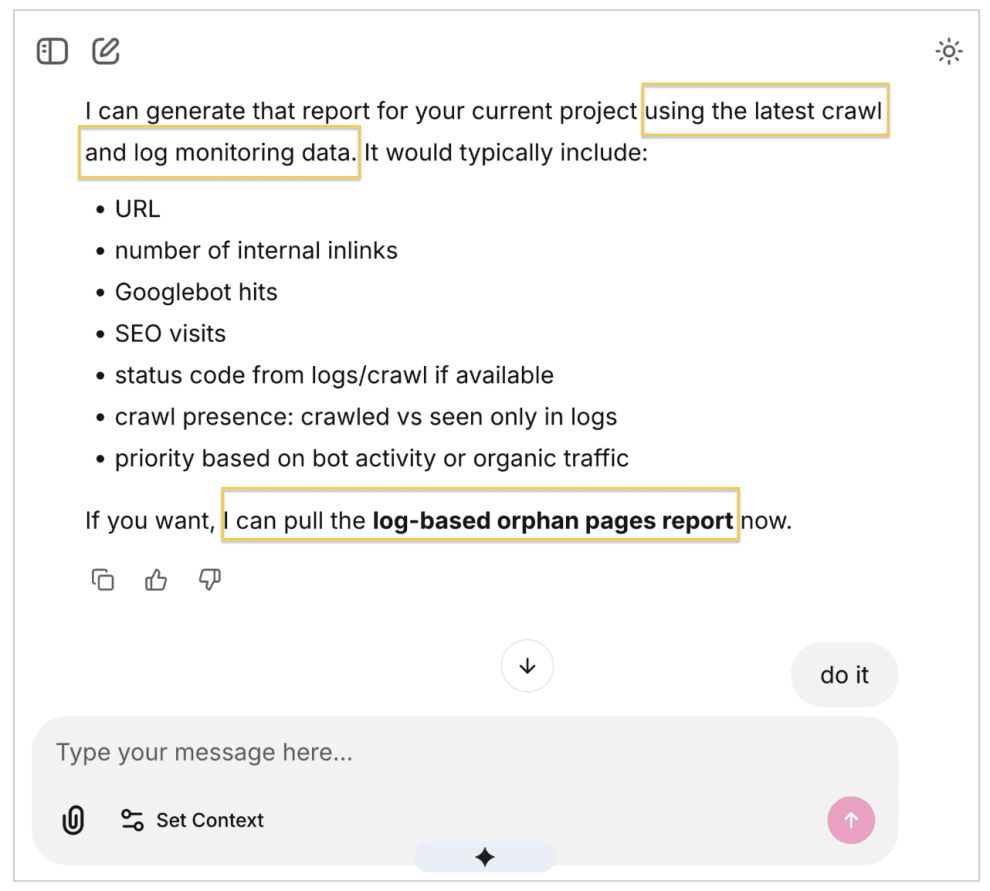
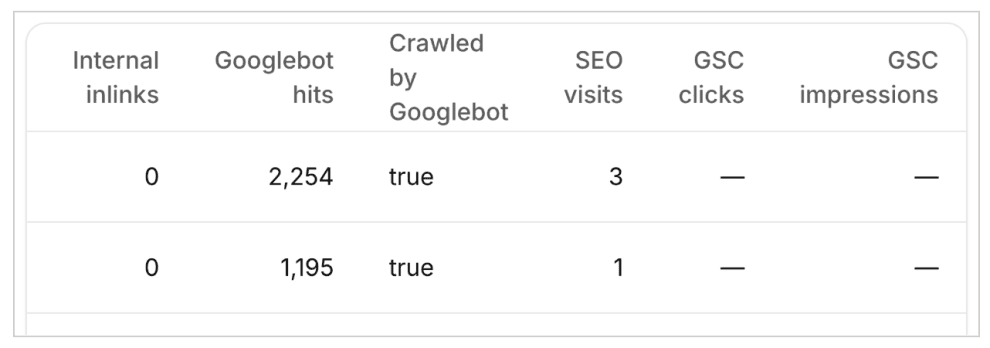
In this example, the top orphan pages had been crawled consistently for six weeks.
Broken landings
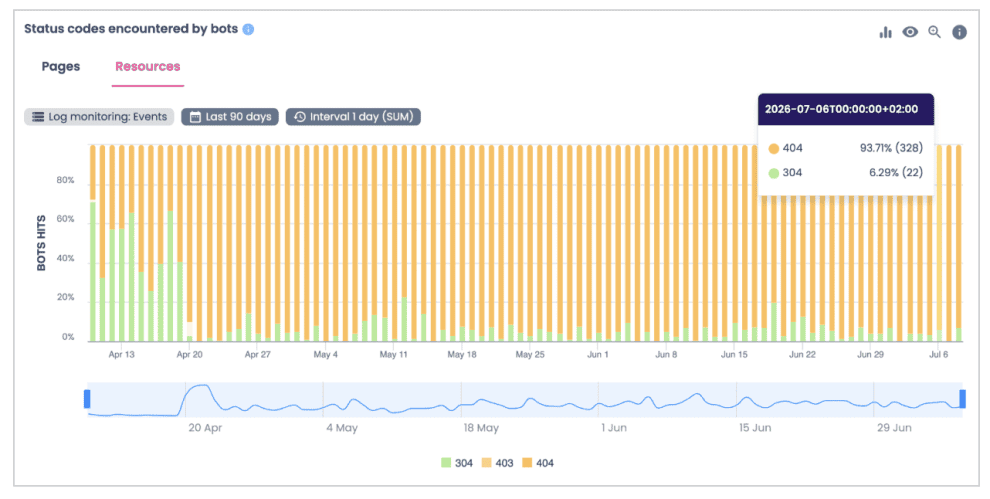
Search now reaches beyond traditional engines. LLM training bots and user-triggered agents like GPTBot and Claude-SearchBot crawl your infrastructure too. If they hit a 403 Forbidden or 404 Not Found, your brand drops out of AI answers.
How to fix it, unless you are blocking them on purpose:
- For a 403, configure the server to allow these bots.
- For a 404, put the correct 301 in place.
Oncrawl’s log analyzer breaks down status codes for pages and for resources. Pulling a 90-day resource view, I found over 300 resources (images, videos, documents) returning 404s and 403s.
Absence of signal (the negative audit)
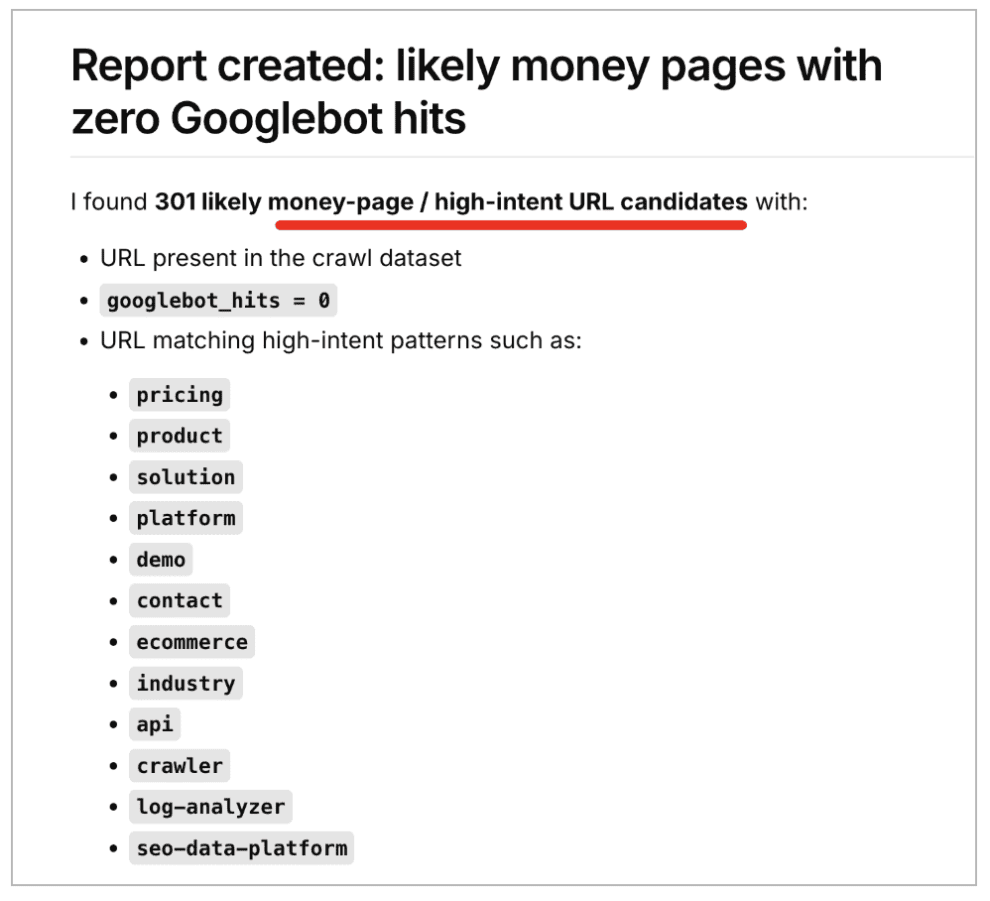
I learned this “absence of signal” idea from Pedro Dias (log file analysis). Map your sitemap URLs against your logs. If 30% of your high-value money pages have had zero Googlebot hits in 30 days while deep pagination gets crawled daily, you have a structural internal-linking problem. Google cannot index what it never fetches.
How to fix it:
- Remove heavy JavaScript-rendered menus.
- Make sure critical links sit directly in the raw HTML.
The rendering gap
Google indexes in two waves: it fetches static HTML first, then renders JavaScript. Your logs show if it stalls at wave one.
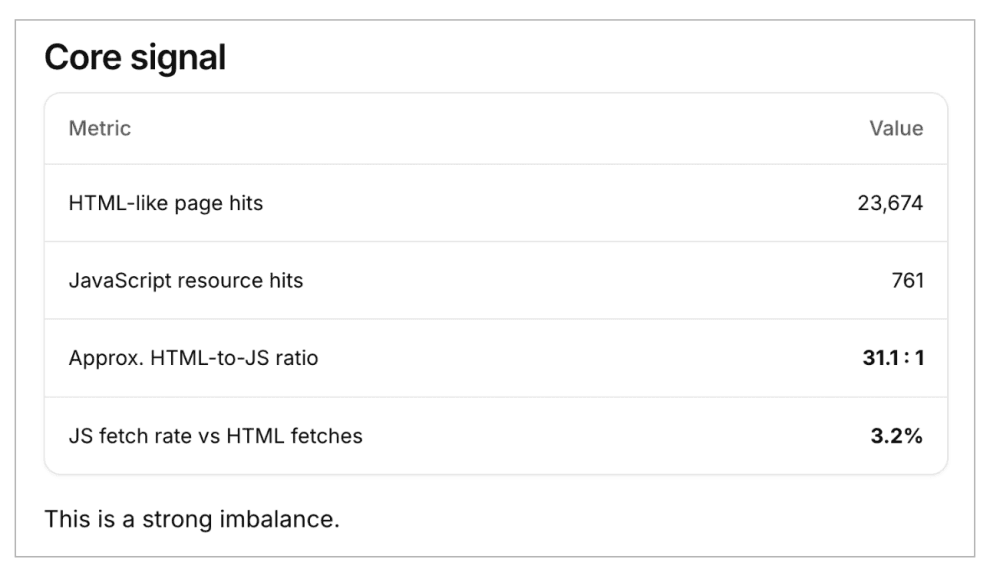
If a product’s HTML page gets 10,000 requests but your main JavaScript bundle gets only 1,000, the second wave is not firing consistently.
How to fix it:
- Minimize JavaScript rendering and never place essential content or links behind it.
Again, using Oncrawl’s AI assistant, I found a 31:1 HTML-to-JavaScript ratio, a sign that JavaScript rendering may be failing to execute critical content alongside the static HTML. That’s definitely something worth a deeper look.
Wasted crawler energy
Scan your logs for URLs with needless parameters: search queries (?search=), tracking strings (?utm_source=, ?campaign=), and faceted filters (?filter, ?color).
I audited one client whose logs showed 95% of Google-crawled pages were ineligible for the index. A large volume of crawled-but-not-indexed pages sends a poor-quality signal and that architecture flaw cost the client over 40% of their organic traffic.
How to fix it:
- Remove the links from the HTML entirely.
- Where needed, tag them noindex, follow (not always the right move).
- Wait for them to drop out of Google’s crawl.
- Once gone, block the URL patterns so they do not return.
5. Semantic value: more traffic, visibility, and AI citations
Let’s talk about a metric that gets too little attention: query count per page, or how many queries a single page can rank for.
If you look at two competing brands in the same space, it’s easier to see why it matters:
- Brand 1 is strong in its niche. Its top page ranks for around 850 queries in Search Console, despite thin content.
- Brand 2 is weaker. Its top page ranks for around 300 queries, despite heavy per-page optimization.
When brand strength is high, Google leans on it and needs less semantic depth from the content. For Brand 1, small optimizations were enough.
For Brand 2, I had to work far harder to reach similar positions. The lesson: if your brand is not strong enough, you compensate with excellent content.
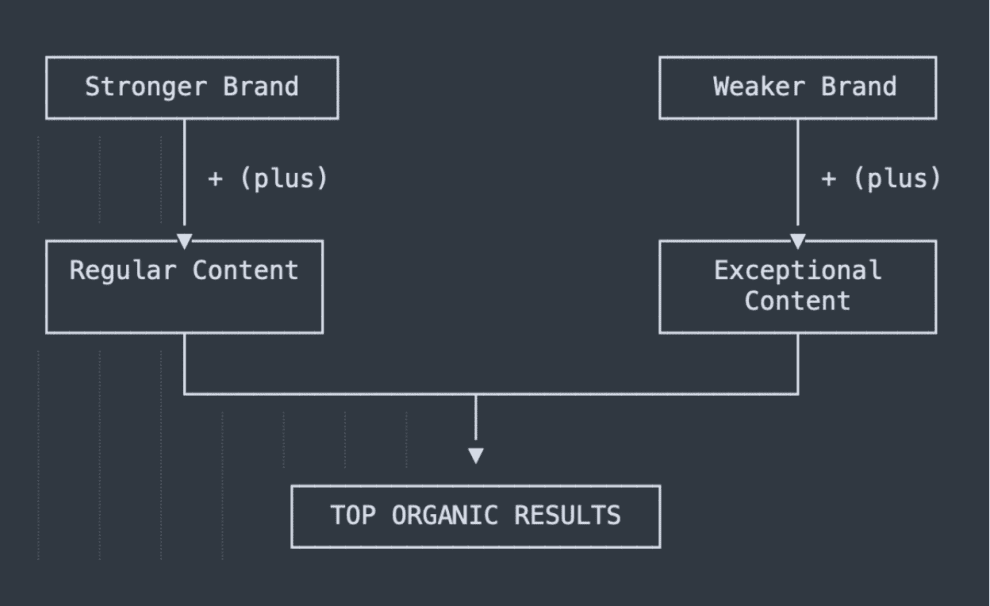
Since I cannot teach you how to build a brand here, let’s assume you are Brand 2, trying to win in the SERPs, in rankings, and in citations. What you’ll need is to strengthen your structural semantics.
Structural semantics
Think of a site as a monolith with meaning of its own, not page by page but as a whole. You strengthen it by extending its structure to cover many angles of a topic across the site.
In e-commerce terms, a single “shoes” collection will not rank for modifiers like “small shoes” or “red shoes.” Adding pages should be deliberate, not random, to avoid cannibalization, where several pages compete for the same topic and drag down your query count per page.
Google reveals intent through the SERP. If two keywords return very different results, the intent differs and can be captured with separate pages. Here is the process:
- Start with a short-tail core topic (“shoes”).
- Match or filter the keywords it already ranks for in Search Console.
- Run them through a keyword clustering tool.
- Review the clusters it returns, each a candidate for its own page.
- Add those pages to your site.
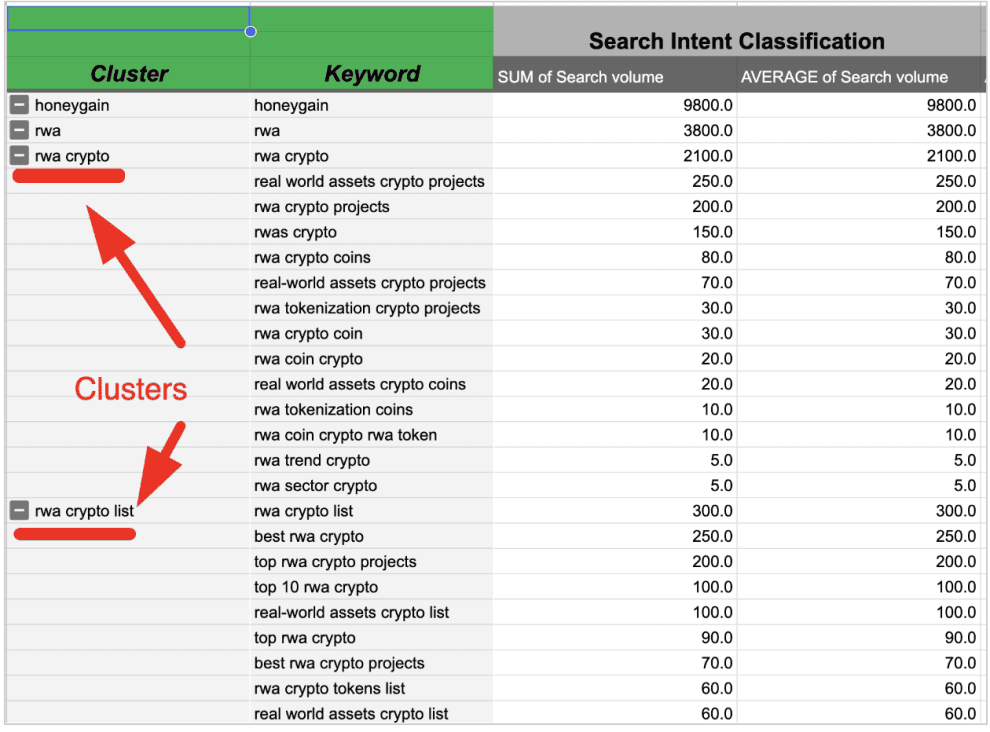
This mirrors how LLMs handle query fan-out, in reverse: they split a broad input into distinct intents with their own terms. If you have already covered those intents with distinct pages, you match intent better, which supports both AI citations and rankings.
Caveat: distinct intents deserve distinct pages, but the pages must be different. In e-commerce it is common to see “different” pages listing the exact same products, which causes cannibalization and should be avoided.
On-page semantics
Every page adds to the site’s value, so a healthy indexed-pages ratio matters: each page either lifts or drags the others.
On-page semantics means covering every useful angle of a single intent while staying focused. On a shoes page, that means everything a buyer needs: pain points, jobs to be done, and so on.
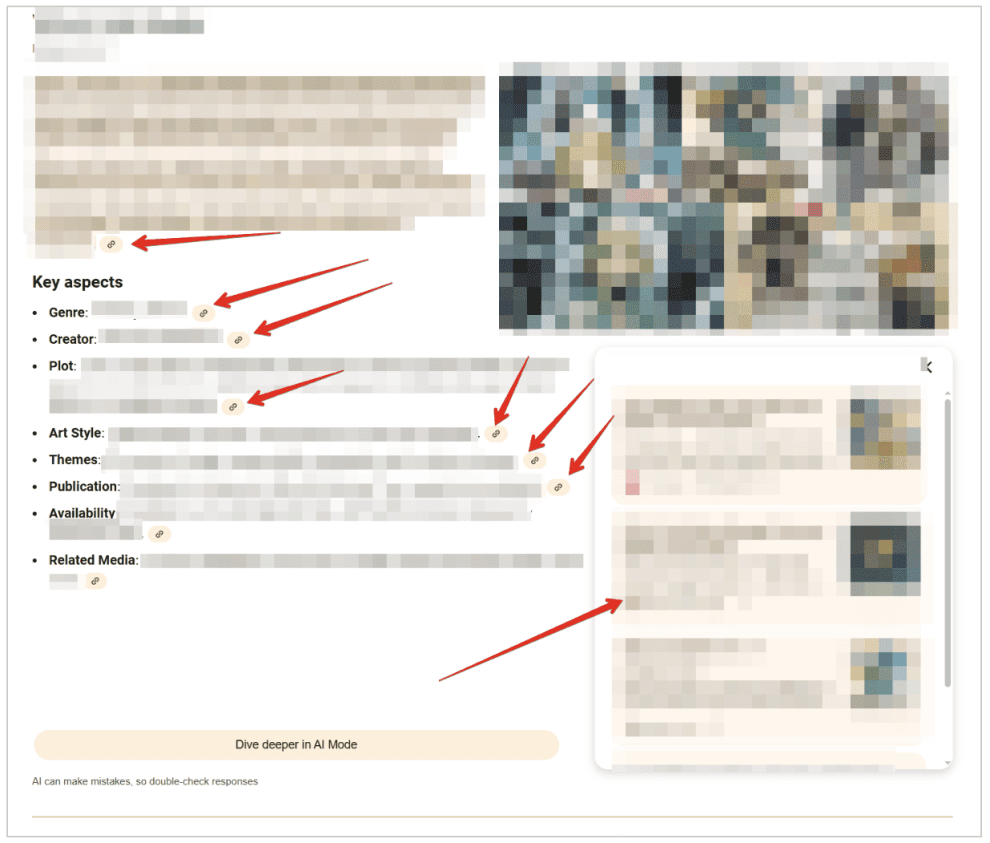
Below is an example where our content shaped the AI response directly. AI Overviews pulled from our client’s page and structured its answer much like our copy, giving up most of the citation links.
Technical SEO underpins the brand
I have seen weak brands win organic traffic on the strength of technical SEO and content structure and I have seen strong brands bleed money over structural technical issues.
Technical SEO is a growth asset and its impact has only grown with AI chatbots like ChatGPT, Perplexity, and Gemini.
Treat technical governance as a high-yield investment: by optimizing for resource efficiency, larger organizations protect their margins and keep their inventory accessible to both search engines and AI agents.
Technical SEO was always more than redirects and meta tags. Now its impact is too big to overlook.