
If you want to know how search engines and AI systems really move through your site, there is one source that records every request: your logs.
Every time Googlebot, Bingbot, an AI crawler, or a real visitor requests a URL, your server writes it down. An SEO log file analyzer turns that raw record into something you can actually read and act on.
This guide explains what log files are, why they tell you things Google Search Console can’t, and how to set up log analysis with Oncrawl so you can start using that data for your SEO.
What is a log file?
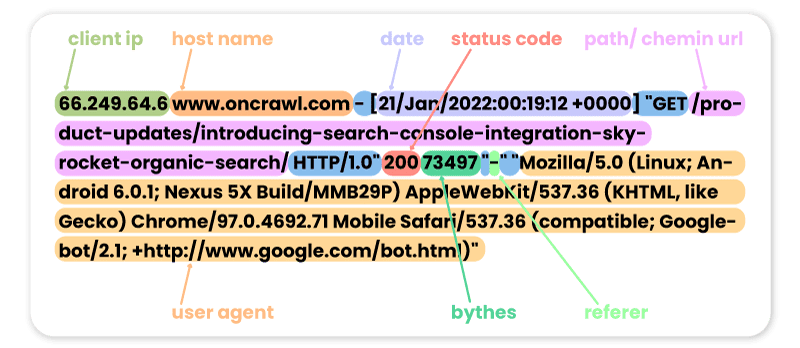
A log file is a record your server keeps of every request made to it. Each line captures who made the request, what they asked for, and how the server responded.
That usually includes the IP address of the caller, a timestamp, the URL requested, the user agent (which tells you whether it was Googlebot, another bot, or a human), the response code, and, depending on your server configuration, the size of the response and the time taken to serve it.
Nothing about this data is sampled or estimated. If Googlebot requested a URL 800 times in a single day, every one of those requests is in the log.
If no request has been made in 60 days, its absence is in the log too. That completeness is what makes log files so valuable and it is why they remain, in the words often attributed to Google’s John Mueller, one of the most underrated sources in SEO.
Why log files tell you more than Search Console
Most SEOs start with Google Search Console and it is a very useful report. However, it summarizes Google’s crawling activity rather than exposing every request and it only keeps a rolling window of history. You are seeing a summary, after the fact, of what Google decided to report.
Your logs have no such limits, provided you retain them. They record every request, from every bot, kept for as long as you choose to store them.
When you want to know exactly which pages Googlebot visited last Tuesday, how often it returns to your top category pages, or whether it is wasting time on parameter URLs that generate no traffic, the answer is most reliably found in your logs.
One of the most common applications of log analysis is crawl budget optimization, but that is only part of the picture. The same data can help you investigate indexation issues, validate migrations, monitor AI crawlers, detect technical regressions, and understand exactly how bots interact with your site over time.
What an SEO log file analyzer does
Reading raw log files by hand is not realistic. A single large site can generate hundreds of millions of log lines a day, and the raw format is dense and repetitive.
A log file analyzer ingests all of that, cleans it, filters out the noise, and organizes it into views you can work with.
With a good analyzer you can see:
- Which pages search engine bots crawl, how often, and which pages they never reach
- How crawl activity is spread across your site, so you can compare product pages, category pages, and other sections
- Status codes over time, so you catch a rise in 404s or server errors before it costs you traffic
- Pages that are frequently crawled versus those that rarely or never receive crawler visits
- Orphan pages that still receive crawler visits even though nothing on your site links to them
The real power comes from combining log data with other SEO datasets. On its own, a log file tells you what bots did.
Combined with a crawl, Google Search Console, or analytics, it tells you whether they crawled the right pages, whether those pages are indexed, and whether they actually generate business value.
How to use Oncrawl’s log analyzer
Getting your logs into Oncrawl typically requires little ongoing development work. You connect a source once, and Oncrawl handles the ingestion and processing from there.
You can bring your logs in through cloud storage and CDN connectors, including Amazon S3, Google Cloud Storage, and Akamai, or by uploading files directly over FTPS.
Oncrawl processes logs from Apache, Nginx, and IIS servers, and any server that provides a JSON log file, handling hundreds of millions of filtered log lines a day, so site size is not a barrier.
Once your logs are flowing, you can monitor bot activity in near real time with live log monitoring, break it down by segment to compare how bots move across product pages, category pages, and other sections, and track bot hits, SEO visits, and status codes over time.
You can also cross your log data with crawl data, Search Console, and analytics to answer your own questions.
What you can do with the data
Once your log analysis is running, a few use cases deliver value quickly.
AI bot monitoring
Log files are one of the clearest ways to see how AI systems read your site. Oncrawl identifies visits from AI crawlers including GPTBot (OpenAI), Perplexitybot, ClaudeBot, and Gemini, alongside traditional search engine bots, so you can track whether your content is being picked up by the systems that increasingly shape visibility.
Technical issue detection
Log analysis helps uncover technical problems that crawlers encounter in the real world. You can identify recurring 404s, spikes in server errors, redirect chains, or slow responses that may not be obvious from a site crawl alone because they only appear during live bot visits.
Regression detection
Because logs record everything as it happens, you can catch problems early. A jump in error codes, a drop in crawl frequency on a key section, or a bot suddenly ignoring newly published content all show up in the data before they turn into a ranking loss you notice in analytics weeks later.
Crawl budget optimization
Log data shows you exactly where search engines spend their crawling, so you can find the low-value pages eating your budget and redirect that attention to the pages that matter. For a full walkthrough, see our guide on crawl budget.
Migration and cleanup validation
When you move a site or remove old pages, logs let you confirm what bots are actually doing, so you can see which URLs still receive crawls and need redirects and which are genuinely safe to retire.
Indexation investigations
When important pages aren’t appearing in search, log data helps answer why. You can determine whether Googlebot is discovering a page, how frequently it returns, whether it stops crawling after technical changes, or whether the issue lies elsewhere in the indexing pipeline.

Getting started
An SEO log file analyzer gives you the most complete record available: an honest record of how search engines and AI systems interact with your site.
Other data sources provide summaries or partial views. Log files record every request your server receives.
If you want to see what is really happening on your site, take a look at Oncrawl’s Log Analyzer.