Most in-house SEOs already know what to check to make sure your SEO is doing what it should. Crawlability, indexation, redirects, structured data, the list is well documented and widely understood.
What is far less common is a reliable way to ensure those checks actually happen consistently, by whoever needs to run them, not just the person who happens to remember.
I have written before about the personal habits that help you stay on top of SEO day to day, the kind of routine one person builds into their week.
This article takes a different angle. The focus here is the shared process an in-house team runs together: the kind that survives someone going on leave, a new hire joining, or a busy quarter when the usual person is too stretched to remember.
Knowing what to check isn’t the same as having a process
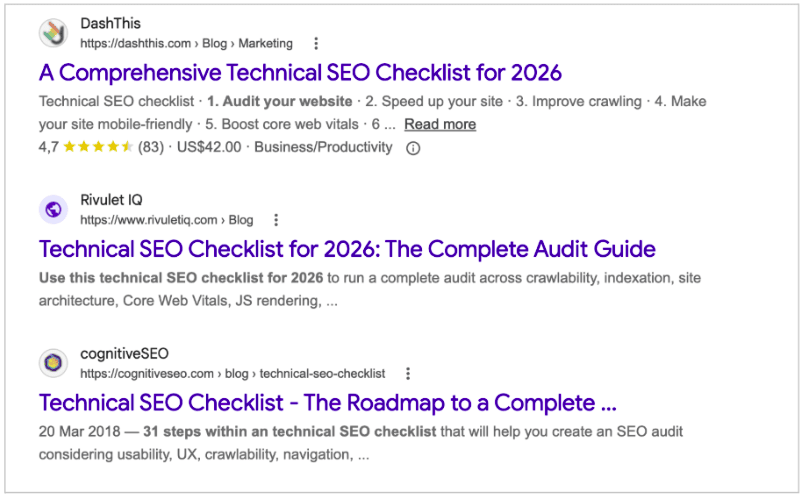
Checklists and audit guides are everywhere. Type “technical SEO checklist” into Google and you will find dozens of comprehensive, well-researched lists covering everything from canonical tags to Core Web Vitals. None of that is the problem.
The problem starts when that knowledge sits in one person’s head, or lives as an informal habit rather than a documented process. It breaks down the moment a launch gets tight, someone goes on leave, or a new template goes live without anyone running the usual checks.
I worked with an in-house e-commerce team that rolled out a new product listing template ahead of a seasonal sale. A noindex tag carried over from the staging environment made it into the production build across a significant number of product listing pages.
There was no defined step in the release process for checking indexation status after a template change, so nobody caught it before launch. By the time organic traffic to that section had dropped significantly and they contacted me for external support, over two weeks had passed, most of it during the team’s busiest trading period. The fix took under ten minutes once found. Finding it took over two weeks, because no one owned the job of checking.
What a process adds that a checklist doesn’t
The checks themselves (including crawlability, indexation, redirects, structured data, Core Web Vitals) are well covered and you can easily find useful resources. However, what turns a list of checks into a process is three things:
- Defined ownership of each check, assigned to a role rather than a name.
- A regular cadence for running them.
- A clear trigger that tells the team when checks need to happen, such as before and after any template, CMS or platform change.
Without those three elements, even the best checklist is just a document nobody is accountable for using.
Why monitoring now needs to cover AI systems too
For years, technical SEO monitoring has focused almost entirely on how traditional search engines crawl and index a site. That focus is no longer enough and the major platforms are catching up to this themselves.
Google launched dedicated Search Generative AI performance reports in Search Console in June 2026, giving site owners isolated visibility into how often their pages appear inside AI Overviews, AI Mode and generative AI features in Discover.
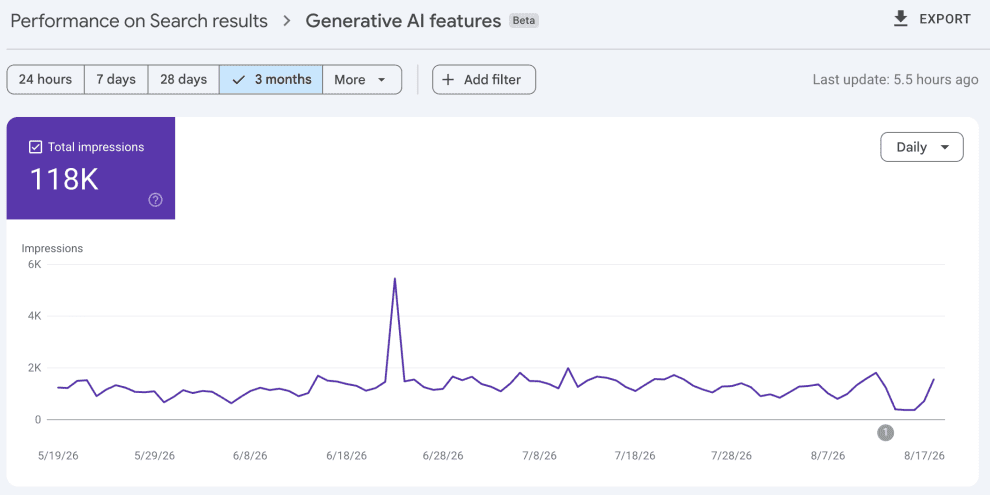
It also introduced a toggle that lets site owners decide whether their content should be used to ground those AI features at all.
Microsoft made a similar move earlier in the year, adding an AI Performance feature to Bing Webmaster Tools that shows how often a site’s content is referenced as a source across Microsoft Copilot and Bing’s AI-generated summaries.
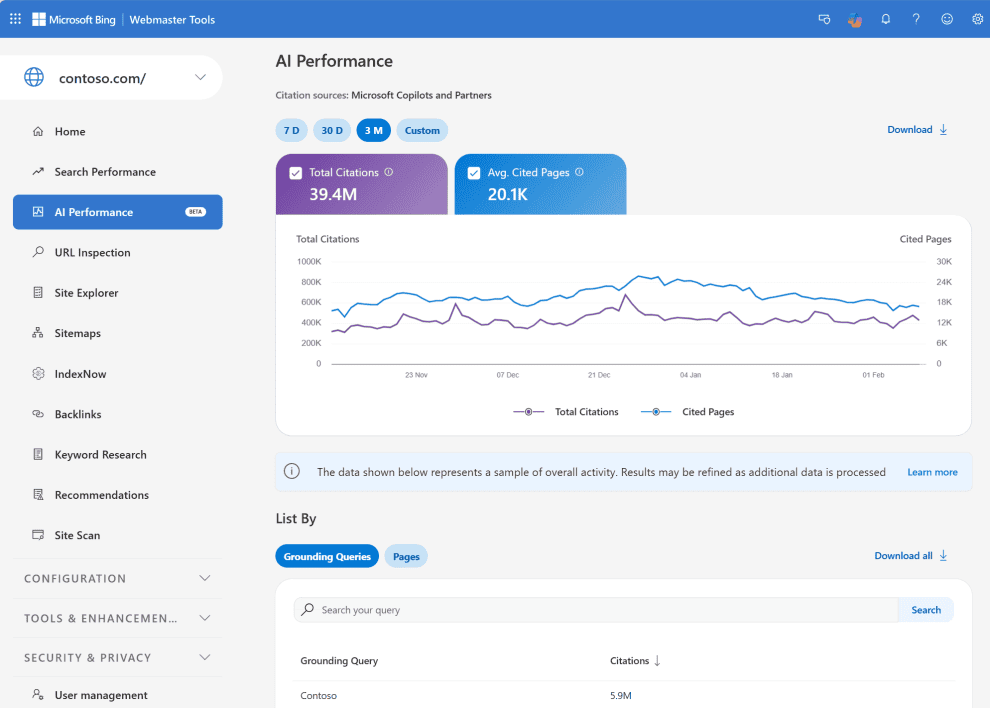
Both tools have real limits worth knowing before relying on them.
Google’s report shows impressions only, broken down by page, country, device and date, with no click, CTR or query data yet.
Bing’s report, similarly, covers Copilot and Bing’s own AI summaries, not ChatGPT, Perplexity, Google AI Overviews, Claude or Gemini.
Neither gives a complete picture on its own, but both give in-house teams something they did not have before: first-party data confirming whether a site’s content is actually being used inside AI-generated answers, rather than relying on guesswork or third-party estimates.
AI crawlers and bots, including GPTBot, ClaudeBot, PerplexityBot and similar also need monitoring at the crawl level, not just at the visibility level. A noindex tag, a blocked directory, or a broken robots.txt rule can quietly cut a site off from AI-driven discovery in exactly the same way it would from traditional search, without anyone noticing until these new reports show a drop, or referral traffic falls away.
Automated monitoring and alerting matter here precisely because they catch these regressions as they happen, across both traditional and AI crawlers, rather than relying on manual checks after every change.
The takeaway is simple. Bringing these checks (the Google Search Console generative AI report, the Bing AI Performance dashboard, and crawl-level monitoring for AI bots) into the same regular process as your traditional technical checks is what makes AI monitoring sustainable, rather than something you revisit only when someone happens to think of it.
Building a process that survives someone being away
The clearest sign a process belongs to the team rather than to one person is what happens when the person who normally runs the checks is on leave, off sick, or has simply left the company. If nothing changes, the process works. If checks quietly stop happening, the process never really existed in the first place.
Three things make a process resilient:
- Documentation that is specific enough for someone unfamiliar with the site to follow.
- Clear ownership assigned to a role rather than a named individual.
- Enough redundancy that at least one other person on the team knows how to run each check.
Documentation
One small habit that is easy to overlook but makes a real difference: using annotations to log every meaningful change directly on the timeline where traffic is reported.
In GSC, right-click on a date in the Performance report chart, select “Add annotation,” and write a short note up to 120 characters. It appears directly on the chart from that point on, visible to anyone with access to the property. Google suggests using it for exactly this kind of event, infrastructure changes like a template update or a site migration.
GA4 works the same way. Open any report with a line graph, right-click a data point, and select “Add annotation.” Add a title, up to 60 characters, and a longer description, up to 150 characters, then save. The note appears on that chart and on every other report using a line graph for the same date.
Months later, when a graph shows an unexplained dip or spike, nobody has to rely on memory to work out what happened around that date. The annotation is already there. It is a small habit, takes under a minute each time, but it turns “I think we changed something around then” into a documented fact anyone on the team can check.
Ownership
Ownership matters just as much as documentation. A simple table makes this concrete:
| Check | Owner (role) | Cadence | Backup owner | Escalation trigger |
|---|---|---|---|---|
| Indexation status after template/CMS changes | Technical SEO lead | Before and after every release | SEO executive | Any unexpected noindex or drop in indexed pages |
| Crawlability (robots.txt, redirects) | SEO executive | Weekly | Technical SEO lead | New 4xx/5xx spike or blocked key pages |
| AI crawler access (GPTBot, ClaudeBot, PerplexityBot) | Technical SEO lead | Monthly | Marketing manager | Sudden drop in AI referral traffic or crawler activity |
| GSC generative AI performance | SEO executive | Monthly | Technical SEO lead | Sharp change in AI Overview/AI Mode impressions |
| Core Web Vitals | Developer/SEO executive | Monthly | Technical SEO lead | Any page failing thresholds |
| Structured data validity | SEO executive | After content/ template changes | Technical SEO lead | Schema errors in GSC |
A table like this takes under an hour to build and can be adapted to fit any team’s structure. What matters is not the exact format; it is that ownership, cadence and escalation are all written down somewhere other than one person’s memory.
Redundancy
The table above includes a backup owner for every check, but a name in that column is not redundancy on its own. It becomes real only once the person named has run the check themselves.
The backup needs enough familiarity with the process to step in without having to start from scratch or wait for the usual owner to return.
Everyone doesn’t need to be an expert in every area of technical SEO, but there should be enough shared knowledge within the team that a key check doesn’t stop because one person is unavailable.
Three habits make that happen without much overhead:
- Rotate the check occasionally. Let the backup owner run it every third or fourth cycle instead of the primary owner. Their knowledge stays current and anything the documentation glosses over tends to surface fast.
- Let the backup follow the documentation cold. Ask them to work through it without checking in with the usual owner. Every question they have to ask is a gap worth writing down and it’s the quickest way to find out whether your documentation is specific enough for someone unfamiliar with the site.
- Sort out access before it is needed. The backup needs their own Search Console permissions, platform seat, log file access and CMS visibility ahead of time. Chasing an access request is a common reason a check quietly does not happen while someone is away.
The overall goal is to make sure that an absence won’t create a gap in monitoring. If someone can pick up a check, follow the documented process, identify anything unusual and know who to escalate it to, the process belongs to the team rather than an individual.
Making a process sustainable
Documentation, ownership and redundancy keep a process alive when people come and go. Time applies a slower kind of pressure.
Sites change constantly with updated templates or new integrations and gradually you find that the checks that mattered in January are not always the ones that matter in October.
What keeps a process useful across that stretch is the work happening around the checks rather than the checks themselves. It’s important to follow how a problem travels from the person who spots it to the person who can fix it, how often the process gets reviewed, and how much of it runs without anyone having to remember.
Communicating findings when something looks wrong
A process is only as useful as what happens after it flags a problem. In-house teams should have a clear, low-friction way of escalating when a check uncovers a risk, whether that is a quick message in a shared channel, a flag in a project management tool, or a five-minute conversation with whoever owns the affected pages or template.
The goal is to surface issues early while they are still small and easy to fix, rather than discovering them after they have shown up in a traffic report weeks later.
Keeping the process alive over time
A good process does not stay static. As a site changes, new templates get built, new integrations get added, new content types get launched, the checks that matter most will shift too.
Building in a habit of reviewing and refining the process every few months, feeding in lessons from whatever has gone wrong recently, keeps it useful rather than letting it quietly become outdated.
Where a monitoring platform fits in
Manual checks still depend on someone remembering to run them. This is where a monitoring platform earns its place. A platform that crawls your site on a schedule and alerts the right owner when indexation, crawlability, or AI bot access changes takes the pressure off any single person’s memory.
Oncrawl monitors how both search engines and AI systems crawl and index large, complex sites, so your team can see a regression the moment it happens rather than weeks later in a traffic report.
The bottom line
Knowing what to check has never been the hard part. Every experienced SEO already knows what crawlability, indexation and structured data checks matter.
What separates teams that catch issues early from teams that find out three weeks later, after the traffic drop, is whether there is a process behind those checks that survives a busy quarter, a new hire, or someone being on leave. Build that, and the checks start taking care of themselves.
Bonus content
Feel free to take a look at Kelly-Anne’s short-form video for the Myth vs. Data series: